

The design rules of the Manufacturing category are described below. The Manufacturing category of design rules. Done - 26.6, at Beta release: disable Beta and Altium employee for the conditional box above, enable Beta and Altium employee for the conditional box below. When PCB.Rules.RuleSets is out of Closed Beta, at the Public release: delete the conditional box and the content above, remove the…
Altium's MCAD CoDesigner technology connects the mechanical and electrical design domains, allowing the mechanical and electronic engineers to pass the loaded PCB back and forth between the two domains. In your Altium design software, this is achieved through an extension that loads and extracts board and component data from the PCB editor, the MCAD CoDesigner extension. In the MCAD software the…
Supported MCAD Software The following MCAD platforms and versions are currently supported: Autodesk Inventor Professional® Autodesk Fusion® (Microsoft Windows version only. Autodesk Fusion Personal license only supported by Altium CircuitMaker) Dassault Systemes SOLIDWORKS® (Standard, Pro & Premium) PTC Creo Parametric® Siemens® NX™ - (for designers with an Altium Enterprise Solution) For details…
When UI.ModernDesignReusePanel is in the Public state - update the blue box below with the source code of the 'Open Beta Feature Moves to Public' snippet. The Design Reuse panel that is used to manage reuse blocks and described on this page is in Open Beta and available when the UI.ModernDesignReusePanel option is enabled in the Advanced Settings dialog. When this option is disabled, the previous…
The Design Reuse panel that is used to manage snippets and described on this page is in Open Beta and available when the UI.ModernDesignReusePanel option is enabled in the Advanced Settings dialog. When this option is disabled, the previous iteration of the panel described on the Working with Reuse Blocks & Snippets page is used. The snippets feature allows you to save any selection of circuitry…
The following sections list historical release notes for Public releases of Altium Designer (from version 25 down to 20.0). For the latest release notes for Altium Designer, Altium Designer Develop and Altium Designer Agile, visit the Public Release Notes page. Looking for public release notes for all previous versions of Altium Designer? Visit the Legacy Documentation section of the Other…
When you first transfer the boards into the multi-board assembly editor, they are neatly placed on the same plane – you can imagine them as all being laid out next to each other on a virtual table. Within a few minutes, you will have moved this one, rotated that one, and pulled another one closer to you! And then you will have rotated the view, now you are not even sure which way is up! Working…
The Multi-board Schematic editor provides a range of graphical element tools that can be used to place basic, free-form drawing elements in a multi-board schematic sheet. The type of graphical tool to be placed can be selected from the Place main menu. Place a graphic element by clicking to position its first node/point and then again to place following nodes, therefore determining its size –…
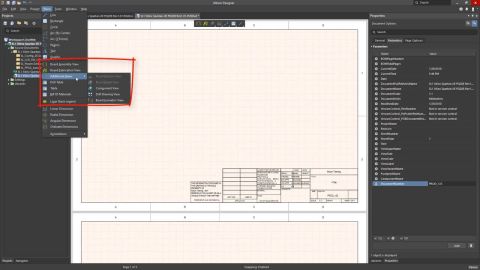
A Draftsman board fabrication view (Place » Board Fabrication View) is an automated graphic composite of the PCB project's unpopulated (bare) board, as viewed from the top or bottom. The drawing data is sourced from a specified physical board layer, and additional layers can be shown as required. Two placed board fabrication views that show the top and bottom layers of the PCB For even greater…
Altium Designer, in conjunction with the Altium 365 Workspace, brings support for an advanced project construct that targets the development stage of the project lifecycle, simplifying the creation and ongoing workflow for version-controlled projects. Centralized storage under the control of the Workspace also enables this feature to be a foundation for other collaborative services. Some key…
Learn More
Equip engineers with everything needed to design modern, high-performance PCBs.
Combine advanced PCB design with cloud-based collaboration to streamline development.