





Altium Designer: Key Benefits of ActiveBOM Webinar


What is ActiveBOM?
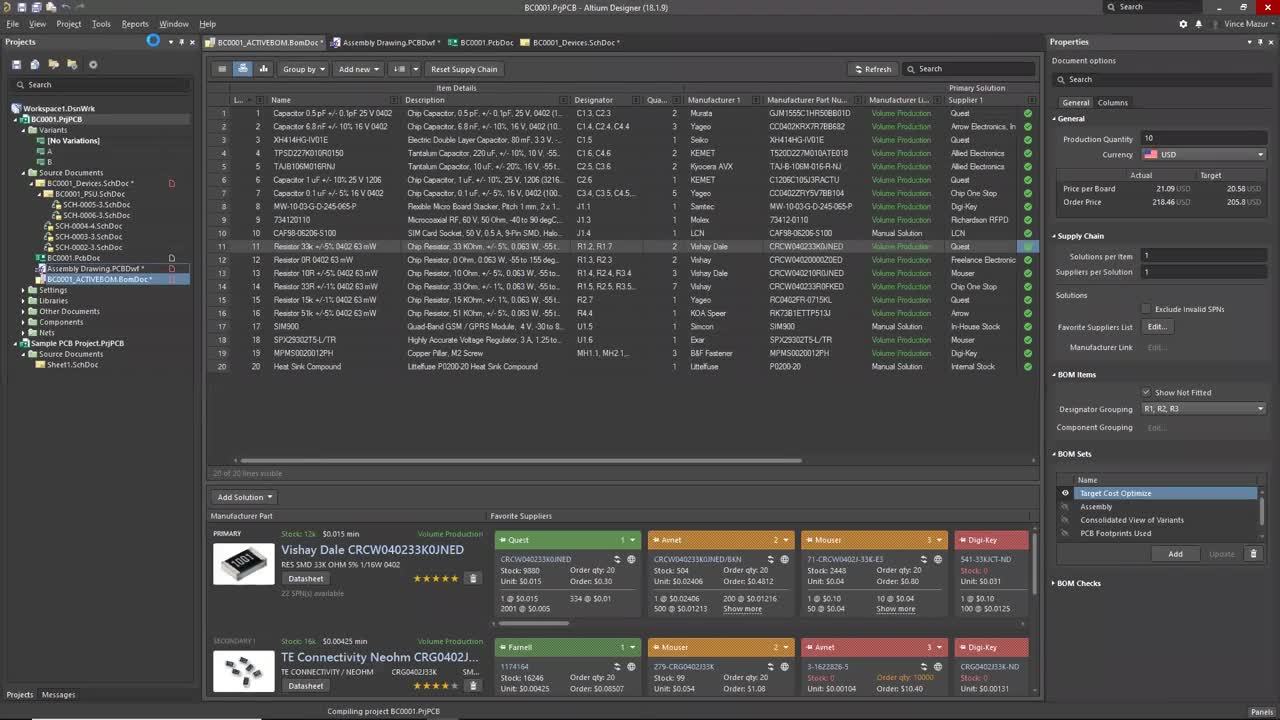
ActiveBOM is an editor in Altium Designer that sits alongside, in importance, with the schematic and PCB editors. You can think of ActiveBOM as an alternative (table-based) way to view and interact with your design. The schematic provides the logical representation of the design and the PCB provides the physical representation. ActiveBOM supplements these two domains with focus on selection, sourcing and cost of the items needed to realize the PCB assembly in volume.
Advancing a design through manufacturing can be derailed if any of these three domains is compromised. You can have the most unique and high-performance design, but if you can’t get the parts at the right time and at the right cost, it’s an uphill battle. ActiveBOM provides designers with a strategic tool to proactively mitigate these issues.
ActiveBOM consumes data from a variety of sources, from global/cloud to on-premise/local, enabling users to optimize the BOM to meet project objectives. The BomDoc is a living project document that is design-aware. It updates in real time to any changes made to the design. Once your BOM is good to go, the BomDoc is the single-source for downstream outputs such as Draftsman® documents, BOM reports and output jobs. ActiveBOM supports any type of Altium libraries you have.
Key Webinar Highlights
I briefly discussed some of the challenges design engineers encounter as they search for, select and source parts for designs. Then, I introduced ActiveBOM and provided a demonstration, followed by a summary and Q&A session (listed below).
Some Component Selection Challenges
It’s key to find the parts that support mission objectives, but there seems to always be a number of issues we encounter, including:
- Finding components that support project goals
- Early identification of at-risk components
- Coping with part shortages at build time
- Counterfeit part risks
- Environmental compliance
- Designing to cost
- Part lifecycle dynamics
Electronic components are like airline tickets – the availability and cost today is different than a month from today. Both are influenced by a variety of dynamic factors that change daily. Frequent, real-time monitoring can help to prevent component issues that can delay board manufacturing.
Overview of ActiveBOM Key UI Areas and Capabilities
Component List Table View
- Complete view of all BOM reflected from design with fully customizable column data/source, line item numbering schemes, reference designation grouping and saved views
- Displays BOM checks (configurable) for aspects such as availability, stocking suppliers, End of Life (EOL), Not Recommended for New Design (NRFND) and more
- Consolidated view displays complete BOM of design variants as well as fitted and unfitted status
- Cross probe directly from BOM reference designator to schematic and PCB
- Supports adding custom items such as custom/stocked parts, NRE costs, glue, mechanical parts, heatsink compound, etc.
Component Supply Chain Matrix
- Rank manufacturer part number (MPN) choices and view available supplier part numbers (SPN), stock, cost, minimum order quantity (MOQ) and price-breaks
- Solution tiles include one-click, direct links to manufacture datasheets and supplier websites
- Favorite suppliers can be defined and prioritized as desired
- Manual solutions can be added for internally stocked parts
Properties Panel
- Change production quantity for an immediate “what-if” analysis view of impact on price-per-board, target price achievement and resultant part choices and supplier part numbers
- View summary of BOM check errors and customize BOM checks
- Select and prioritize favorite suppliers and define BOM sets (saved views)
- Control column visibility and configure data sources
Summary
ActiveBOM provides a tool for getting real-time insight into the parts you need for your designs, and it supports “early and often” monitoring of your BOM to prevent manufacturing delays and setbacks. Additionally, it assists in identifying part choices that can be risky, such as the Not Recommended for New Design (NRFND) and End of Life (EOL) components shown in the demonstration. Best of all, it’s already part of Altium Designer 18 and there’s little to learn.
Questions and Answers
How do you handle parts that are used only partially? For example, suppose you need a 3-pos header, but you can buy only 36 or 40 position breakaway parts?
We currently do not support parts that are used partially. However, we have this request and we will investigate implementing the capability in a future release.
How did you get the ACS parameters to show in the columns list?
Go to the properties panel, click on the “Columns” tab and assure that that the right most “Altium Cloud Services” button is selected. You should see the ACS parameters populate the list of columns. Please note that you will only see those ACS parameters that are populated with values in at least one BOM component.
Our purchasing department manages part procurement and the engineer moves on to other projects as soon as the product is released. Generally, only the engineer has access to the Altium license and we don't want the expensive engineering resource managing logistics. Can ActiveBOM be used without a license by our buyer or logistics people?
ActiveBOM BomDoc files can be opened and saved using a Viewer license. BOMs can be optimized and BOM reports can be generated as well. This provides others in your organization with convenient access to ActiveBOM functionality without the cost of a full Altium Designer license.
Are variants the correct way to handle fitted/not fitted components?
Yes, by using a variant you can “un-fit” those components you do not wish to have installed. This will also assure that the unfitted components are not part of any manufacturing data files generated such as pick-and-place. You can then select the “[No Variations]” Variant to perform BOM cost optimization, parts ordering, etc.
Are the favorite suppliers you assign part of the .BomDoc, project or a global setting?
Any changes you make to the Favorite Suppliers List are considered changes to the properties of the ActiveBOM document and are stored in the .BomDoc file.
Can this ActiveBOM information for each part be added once during library part creation so that the library part has all the approved vendors and related information, or does this have to be done in the ActiveBOM document every time you create a schematic?
Yes, the preferred approach is to add the part choice information once to each component in the library so that it can be leveraged in all designs that use devices from that library. In addition, when using a Vault or NEXUS® managed component library, ActiveBOM will notify users when devices in their schematics are not using the latest version of the component. This enables changes or additions to part choices to be pushed out to designers.
Can any supplier be created and used with ActiveBOM?
The only suppliers that can be used are those supported by Octopart. At present, we support over 200 suppliers.
Can ActiveBOM support alternate parts from alternate manufacturers?
Yes, but the the alternate manufacturers and alternate manufacturer part choices must be defined in the components in your design.
Is there a way to pull parameters from the cloud such as minimum and maximum operating temperature into the active BOM?
Yes, any parameter available can be selected for inclusion into the ActiveBOM document.
Can the BOM sets created be exported to Excel?
Yes, once the selected BOM Set is displayed, simply export the BOM to Excel using “Reports > Bill of Materials” from the ActiveBOM pull down menu.

About Author
Related Resources
Related Technical Documentation
Table of Contents
- What is ActiveBOM?
- Key Webinar Highlights
- Some Component Selection Challenges
- Overview of ActiveBOM Key UI Areas and Capabilities
- Component List Table View
- Component Supply Chain Matrix
- Properties Panel
- Summary
- Questions and Answers
- How do you handle parts that are used only partially? For example, suppose you need a 3-pos header, but you can buy only 36 or 40 position breakaway parts?
- How did you get the ACS parameters to show in the columns list?
- Our purchasing department manages part procurement and the engineer moves on to other projects as soon as the product is released. Generally, only the engineer has access to the Altium license and we don't want the expensive engineering resource managing logistics. Can ActiveBOM be used without a license by our buyer or logistics people?
- Are variants the correct way to handle fitted/not fitted components?
- Are the favorite suppliers you assign part of the .BomDoc, project or a global setting?
- Can this ActiveBOM information for each part be added once during library part creation so that the library part has all the approved vendors and related information, or does this have to be done in the ActiveBOM document every time you create a schematic?
- Can any supplier be created and used with ActiveBOM?
- Can ActiveBOM support alternate parts from alternate manufacturers?
- Is there a way to pull parameters from the cloud such as minimum and maximum operating temperature into the active BOM?
- Can the BOM sets created be exported to Excel?
Solutions for Every Role and Team
- Discover and evaluate design options earlier
- Develop in one shared workspace
- Scale with control and compliance
- Connect every stage of hardware development
Learn More
Thank you, you are now subscribed to updates.