




Flex and Rigid-Flex PCB Design Guidelines and Assembly

At a Glance
Design flex and rigid-flex PCBs for reliable assembly with guidance on stackups, bend regions, routing, component clearances, and manufacturing documentation.


Flex and rigid-flex PCB assembly starts with decisions made during mechanical planning and stackup design. Flex thickness, copper construction, mounting locations, and bend geometry determine whether the circuit can fit its enclosure and survive installation or repeated motion. A layout can satisfy electrical clearances while placing excessive mechanical strain on copper conductors or solder joints. These constraints need to be resolved together before routing begins.
The design also has to support fabrication, component assembly, and final installation. A flex ribbon that fits the finished product may leave the assembler with insufficient support during solder-paste printing or reflow. Likewise, components near a rigid-to-flex transition can experience movement during handling. Early reviews with the fabricator and assembler establish which construction, placement, and handling constraints belong in the PCB layout.
What are Flex Circuits?
PCBs are built to be rigid, rigid-flex, or flex according to their implementation and application. By far, rigid printed circuit boards are the most problematic as the boards may break during manufacturing or handling. For other boards like rigid-flex and flex circuit boards, including some that may be utilized in aerospace systems, a specific degree of flexibility or rigidity is required. Whether rigid-flex or flex, PCBs must adhere to IPC 6013-D, as well as mandatory regulatory requirements for quality according to AS9100D, and reliability as stipulated by IPC-6011.
A well-known commercial example is wearable electronics that include fitness and health monitors. The flexible design of printed circuit boards for aerospace systems is used to provide thermal stability, increase reliability, simplify assembly, and lower costs. Another usage being envisioned is foldable wearables, which can be used to monitor vital signs, as conformal heating elements, and as medical devices.
Flex And Rigid-Flex Design Challenges
Flex and rigid-flex PCBs come with their own set of design challenges. Routing between multiple boards on a rigid-flex PCB spreads your components over a large area, and your enclosure needs to be designed alongside the mechanical shape of your board. Your device application and form factor require you to consider whether your flex elements will be static, dynamic, or creased. Each of these options comes with its own set of flexible design techniques.
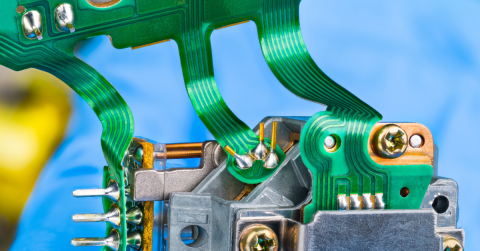
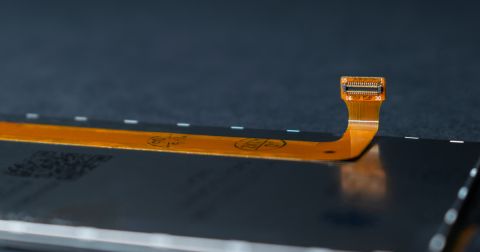
Static flexible PCB ribbons are set in place on the board and are not intended to move (or move very little) when the end product is used. Static flex ribbons are not always creased, they may simply have a slight bend that allows each end of the board to fit in its packaging. Dynamic flex ribbons are intended to bend and move with the device enclosure, but the flex PCB ribbon should not permanently deform during operation. The image below shows an example of a board with static ribbons.

In the above image, the backside of the flex board may be permanently deformed and creased so that the final board keeps its shape. Creased flex PCB ribbons are static flex ribbons that are permanently deformed, and this deformation is applied during PCB manufacturing and assembly.
Mechanical Requirements and Flex Construction
Your standard rigid board only lets you design in two dimensions, whereas flex and rigid-flex printed circuit design can be made three-dimensional. You can design your electronic device with the odd form factor and with interesting new applications in mind. When you’re planning your next electronic medical device, IoT product, or wearable, it pays to know when it’s best to use flex, rigid-flex, or rigid PCB.
There are many mechanical requirements for a flex/rigid-flex PCB, but typically the first requirement that will drive the design is the expected bending behavior. A ribbon folded into an enclosure during installation has different fatigue requirements from one moving throughout product operation. Permanent forming introduces another constraint: the forming process must produce the intended shape while controlling strain in the conductors.
Flex PCB Bending Radius and Location
The bending location and radius need to be carefully placed during design so that the copper conductors do not fracture during deformation. For dynamic double-sided flex circuits, try to avoid laying traces over each other in the same direction. Instead, traces should be offset to prevent excess stress concentration on the outer conductors during bending.


Offset conductors in a flex PCB ribbon.
If your flex circuit needs to carry a power or ground plane, you can use solid copper pours. However, you’ll have to accept significantly reduced flexibility and possible buckling if the bend radius is very tight. It’s best to use hatched polygons to retain flexibility. A normal hatched polygon still has heavily biased copper stresses in 0°, 90°, and 45° angle directions, due to the alignment of hatch traces and ‘X’s. A more statistically optimal hatch pattern would be hexagonal. This could be done using a negative plane layer and an array of hexagonal anti-pads, but it’s fast enough to build the hatch below with cut-and-paste.

Hexagonal hatched polygons as a plane layer in a flex PCB ribbon.
The bending radius location is best placed along a straight section of conductors without any curve in the traces. The allowed bend radius can be calculated in terms of the allowed deformation on the outer edge of the copper conductors in the flex circuit. This is shown below.
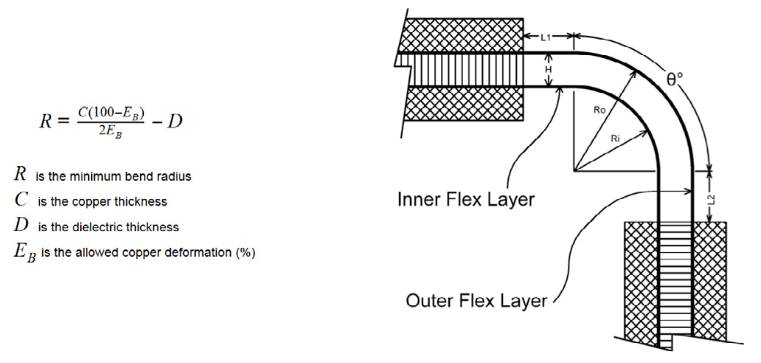
Flex PCB bed radius calculation
The thickness of the copper layer is specified in ounces per sq. in. For power and ground planes a 1 oz thickness of copper is usually used. For signal layers ½ oz copper is typical. Other copper foil thicknesses are available for specialized design. Once you define your bending radius, copper weight, and location in your polyimide ribbon, you can use some mechanical design tools to model how your board will bend and conform to its enclosure.
Stackup, Copper, and Protective Layers
An integrated rigid-flex stackup carries selected flex layers into the rigid sections, where additional materials and copper layers provide routing density and component support. A flex circuit with bonded prepreg stiffeners offers another option when local mechanical reinforcement is sufficient. Stiffeners support connectors and component mounting areas, but they add no routing layers. The choice therefore depends on component escape routing, local stiffness, and manufacturing cost.
Copper weight is an important point to consider because it creates a tradeoff between electrical resistance and mechanical flexibility. Dynamic applications generally benefit from thinner copper and rolled annealed foil as it exhibits better fatigue behavior. Increasing copper weight to carry more current can force a larger bend radius. While increasing copper weight by a factor 2 or 3 may not seem significant (typically amounting to ~mils worth of additional thickness), the impact on minimum bend radius can amount to multiple mm.
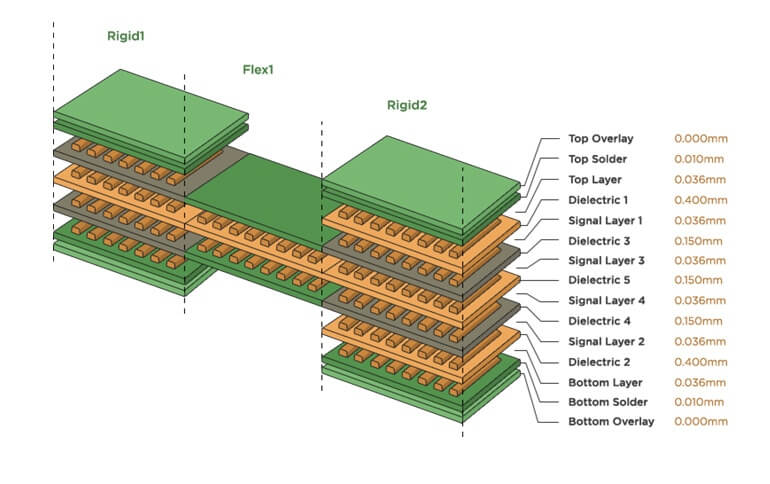
Adhesiveless laminates remove the bonding adhesive between the copper and polyimide, reducing thickness and one source of material variability, however coverlay adhesives and multilayer bonding materials may still be present. Adhesive-based constructions require target adhesive layer thickness values and their dielectric properties to be included in the stackup. Available materials and lamination tolerances should be confirmed before calculating routing dimensions or committing to enclosure geometry.
Routing Through Bends and Transition Zones
Bend regions require routing geometry that traces cross the bend axis approximately perpendicular, with smooth routing changes outside the active bend where practical. On two-layer flex circuits, offsetting conductors on opposite sides reduces the local stiffness created by directly overlapping copper.
Some of the other useful layout constraints include:
- Keep plated holes/vias and SMD pads outside active bend regions
- Use rounded/arced traces, particularly within bend regions
- Stagger the traces on overlapping layers where electrical constraints permit (see the image above)
- Specify epoxy for strain relief along any stiffener edges at rigid-to-flex boundaries that are near a bend
The rigid-to-flex boundary concentrates strain because stiffness changes over a short distance. Bending immediately against the rigid edge can damage entering conductors or separate protective layers. Component and via edge clearances at this boundary require confirmation from the fabricator and assembler.

The defined bend radius and angle can be clearly seen in this 3D view in Altium Designer's PCB editor
Impedance and Return Paths Across Regions
A continuous copper trace can encounter different transmission line geometry as it passes from rigid material into flex. Reference-plane spacing, dielectric properties, coverlay, and surrounding copper may change. Consequently, retaining the same trace width and differential-pair spacing across both regions can produce different impedances. Routing dimensions should be calculated for each construction, followed by evaluation of the transition where channel requirements justify it.
Hatched ground reduces copper coverage and stiffness, but its electrical behavior depends on the pattern. A trace alternately passes over copper and openings, producing impedance variation along its length, so a solid-plane impedance calculation alone provides insufficient characterization of that structure. Hatch pitch, copper coverage, trace position, and differential spacing all influence signal integrity in a flex design. High-speed designs require some level of electromagnetic simulation, particularly S-paramters, to determine whether a hatch pattern creates too much loss and mode conversion.
Assembly Support and Manufacturing Handoff
Assembly planning should identify how each populated region remains stable during printing, placement, and reflow. Rigid sections or supported flex areas provide locations for fixturing. Two-sided assembly also requires a workable support strategy after the first side is populated. Uneven thermal mass across rigid and flexible regions requires reflow profiling on the actual assembly.
The manufacturing package should communicate both the flat construction and installed geometry. Master drawings for a flex/rigid-flex build should identify:
- Stackup regions
- Materials thicknesses and finished copper weight
- IPC workmanship standards
- Assembly handling instructions, including forming locations and radii
- Impedance requirements with specific frequency limit called out
These details connect layout intent to fabrication and assembly processes.
Before release, the fabricator and assembler should review the same construction and mechanical drawings. Their feedback can expose unavailable materials, unsupported placement areas, or forming operations that impose excessive strain. Resolving those issues before tooling and first-article assembly gives the electrical, mechanical, and manufacturing teams a common set of requirements for the finished product.
To learn more about manufacturing file outputs in Altium Designer, watch the video below.
Implementing the Design in Altium Designer
Altium Designer’s Layer Stack Manager supports the substacks needed for different rigid and flexible regions. Board Planning Mode assigns those stacks to the corresponding board areas and allows the designer to define bending lines.These settings should reproduce the approved mechanical construction and installation geometry.
The folded 3D view supports inspection of component placement and board geometry through intermediate fold states. This helps identify interference during assembly as well as in the installed position. Enclosure checks can continue in MCAD using the board and component geometry. Bend-fatigue qualification still requires physical testing or suitable mechanical analysis, such as in the MCAD CoDesigner utility through Altium 365.
Whether you need to build reliable power electronics or advanced digital systems, use Altium’s complete set of PCB design features and world-class CAD tools. Altium provides the world’s premier electronic product development platform, complete with the industry’s best PCB design tools and cross-disciplinary collaboration features for advanced design teams. Contact an expert at Altium today!
Frequently Asked Questions
How do I design a flex or rigid-flex PCB for assembly?
Start by defining the installed shape, bending requirements, and supported component areas with the mechanical designer. Select a manufacturable stackup, establish bend and transition keepouts, and keep solder joints outside areas that will flex. Review panelization, fixturing, reflow, and final folding with the assembler before release so the board remains stable throughout production. Learn more about rigid-flex PCB assembly considerations.
How do I define bend regions and verify component clearances in Altium Designer?
Define rigid and flex substacks in the Layer Stack Manager, then assign them to board regions in Board Planning Mode. Place bending lines and configure their radius, angle, and folding sequence. Inspect the folded 3D model, including intermediate fold states, for interference between components and board sections; coordinate enclosure clearance checks in MCAD. Learn more about rigid-flex mechanical constraints and design verification.
What are the differences between designing for static and dynamic flex applications?
Static flex must survive installation and defined service movements, while dynamic flex must withstand repeated bending throughout its service life. Dynamic designs generally require thinner construction, fatigue-resistant copper, larger bend radii, and tighter control of routing geometry. Bend limits depend on the complete stackup and required cycle life, so static bend guidelines should not be carried directly into a dynamic application. Learn more about static versus dynamic flex design.
What design guidelines should I follow before sending a rigid-flex PCB to a manufacturer?
Confirm material availability, regional stackups, copper specifications, bend limits, and transition clearances with the fabricator. Review routing, vias, component placement, coverlay openings, and stiffeners against those requirements. Manufacturing drawings should identify rigid-to-flex boundaries, bend locations and directions, finished thicknesses, impedance targets, and test requirements. Include the assembler in the release review to resolve support and handling needs. Learn more about flex and rigid-flex fabrication documentation.

About Author
Related Resources
Related Technical Documentation
Table of Contents
- What are Flex Circuits?
- Flex And Rigid-Flex Design Challenges
- Mechanical Requirements and Flex Construction
- Flex PCB Bending Radius and Location
- Stackup, Copper, and Protective Layers
- Routing Through Bends and Transition Zones
- Impedance and Return Paths Across Regions
- Assembly Support and Manufacturing Handoff
- Implementing the Design in Altium Designer
- Frequently Asked Questions
Solutions for Every Role and Team
- Discover and evaluate design options earlier
- Develop in one shared workspace
- Scale with control and compliance
- Connect every stage of hardware development
Learn More
Thank you, you are now subscribed to updates.