

Feature for Feature: Altium Designer versus Mentor PADS


Take a look at the electronic design automation software and computer-aided design software landscape, and you’ll find plenty of options for PCB design software. Altium Designer and Mentor PADS are two popular platforms for professional PCB designers. These two platforms have a number of features in common, but the proactive design engineer should take time to compare how each platform will help ensure productivity.
ALTIUM DESIGNER
A unified PCB design package that integrates advanced PCB design and layout features with data management and ECAD/MCAD collaboration features in a single program.
Your PCB design software is a key determinant of your design productivity, and your team needs access to a complete set of features for taking a new circuit board from idea to finished product. If you’re on the fence between Mentor PADS vs Altium Designer, you’ll find that these two high-level PCB design software platforms are ideal for professional design engineers. However, Altium Designer contains some features that make it unique compared to Mentor PADS.
Compare Altium Designer to PADS
Feature Comparison: Altium vs Mentor
Altium Designer and Mentor PADS both contain many of the standard features any PCB designer would expect to find in their PCB design software. These features include basic board design, component layout, and trace routing tools that are required to build any new circuit board. These features include:
- Schematic design and schematic capture: Your schematic is the foundation for your new product. Both platforms provide flat or hierarchical schematic editing features. Each program contains a schematic capture tool that creates an initial layout from your schematics.
- PCB layout: Mentor PADS and Altium Designer both contain industry-standard PCB layout features that integrate directly with your PCB design rules and constraints. This includes a component arrangement in a standard computer-aided design interface and trace routing features.
Learn more about the layout and routing tools you need for PCB design.
- Mixed-signal simulation and analysis: The best way to test functionality before prototyping is to use simulation and analysis tools. Both platforms contain a variety of simulation and analysis features for analog, digital, and mixed-signal systems.
Learn more about the advantages of integrated simulation features in Altium Designer.
- Production planning and BOM management: Once your new circuit board is ready for production, you’ll need to prepare standard documentation for your manufacturer. Each document must appear in a standardized file format in order for a fabrication house to begin production.
Learn more about preparing manufacturer deliverables with Altium Designer.
- Constraint editing: Altium Designer is built on an underlying design rules engine that allows PCB design rules and constraints to be modified to fit your particular application. Mentor PADS also allows for constraint and design rule editing during board design.
Learn more about working with PCB design rules and constraints.
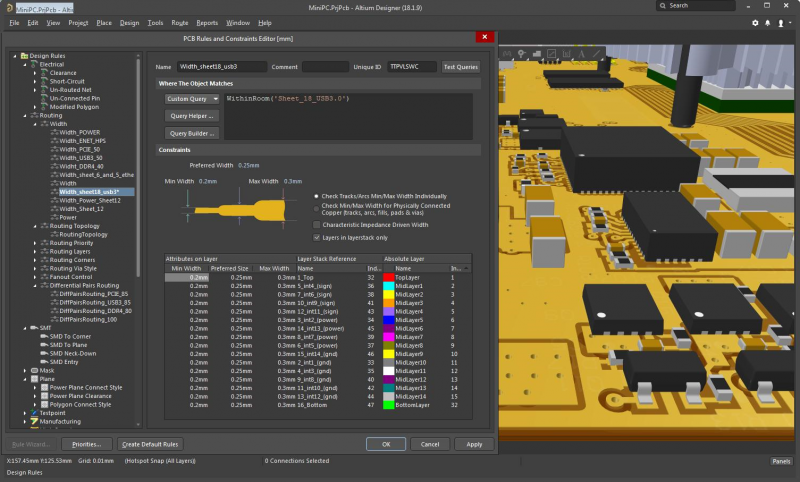
Rules and constraints editing with a 3D layout in Altium Designer
What is Missing from Mentor PADS?
Altium Designer distinguishes itself from Mentor PADS and many other PCB design software programs in that it integrates many more design features into a single program. Altium Designer also has specialized interactive and auto-interactive routing tools that aid layout tasks for more complex board designs. The integrated features in Altium Designer also include an IPC-compliant component creation wizard that instantly generates schematic symbols and PCB footprints for proprietary components.
The data management and production planning tools provide design teams with many important benefits. These tools integrate with the other design features in Altium Designer, whereas Mentor PADS leaves you to adopt a set of third-party software platforms into your workflow. There are other standard design features that are completely absent from Mentor PADS, such as multi-board design, full mechanical design integration, and important collaboration features.
- Rules-driven design: The underlying design rules engine in Altium Designer ensures your PCB design rules and constraints are followed throughout the schematic design and PCB layout process. These constraints can be edited and examined at any time during the layout process, including during interactive routing.
- Multi-board design: Many products outside the consumer electronics space require more than one board for a variety of reasons. Altium Designer includes features for the hierarchical schematic design and PCB layout creation on multiple boards.
- Stackup materials library: Advanced electronics may require an alternative substrate to FR4. With the stack-up materials library in Altium Designer, you won’t need to manually define material properties for alternative stack-up materials. These material properties are included in the simulation tools in Altium Designer.
Learn more about Altium Designer’s stack-up materials library.
- Interactive and auto-interactive routing tools: Routing components with large pin counts can be extremely time-consuming, but Altium Designer’s auto-interactive routing tools help designers remain productive. These tools help you quickly route traces in batches while also checking your design rules as you work, ensuring your board will be functional and manufacturable.
Learn more about Altium Designer’s auto-interactive routing tools.
- Real-time BOM and supply chain management: When editing or reusing existing designs and preparing for a new manufacturing run, your design tools need to provide immediate sourcing and component data updates. Altium Designer’s component management features allow you to instantly swap components in the event components become obsolete or unavailable.
Learn more about BOM and supply chain management in Altium Designer.
- ECAD/MCAD collaboration in advanced mechanical design software: Complex products require mechanical packaging design alongside electrical design. Altium Concord Pro provides the most advanced ECAD/MCAD collaboration toolset within Altium Designer. Altium Designer already includes advanced native 3D design capabilities, and Altium Concord Pro now allows component management and import tools to integrate into popular mechanical design platforms like SolidWorks.
Learn more about electrical and mechanical co-design in Altium Designer and Altium Concord Pro.
- File format import/conversion tools: Altium Designer makes it easy for designers to convert their library files for use in Altium’s design software. Anyone that switches to Altium Designer won’t have to leave their old projects behind.
Learn more about tools for converting design and library files to Altium software’s file format.

Routing a complex PCB like this is easy with the interactive routing tools in Altium Designer
Altium Designer Takes Electronic Design Automation to the Next Level
Mentor PADS and Altium Designer are both excellent PCB design packages, but Altium Designer is a clear winner when it comes to ease of use, design productivity, and breadth of data management features. Altium Designer provides all the standard and advanced design features you need to build cutting-edge technology in a single program, ensuring you remain productive. Compared to Mentor PCB design, Altium Designer provides the easiest platform to learn and use.
Features and Benefits of Altium Designer
Altium Designer provides the industry-standard printed circuit board design features you expect to find in any electronic design automation software program and much more. The schematic design, schematic capture, layout design, and simulation features integrate into a single software platform, which allows you to design with peak productivity. The components management and production planning tools in Altium Designer are ideal for team collaboration and data sharing, helping you smoothly transition to production. The best part of these features is that they are all accessible within a single program, rather than being separated into different programs.
Altium Designer also gives design teams access to a number of add-ons that are ideal for specialized applications. The TASKING, xSignals, PDNA, and IPC Footprint tools also integrate into Altium Designer. Contrast this with Mentor PADS designer, which still separates many features into different software applications. All the features in Altium Designer are built on top of a rules-driven design engine, allowing your design rules and constraints to be accessed by any of the features in Altium Designer.
The new materials library in Altium Designer allows you to easily select from a large number of common materials for use as your core, prepreg, and laminates. You can also design your ground plane and signal layers as part of your stack-up. Once you’ve finished your layout, you can then take your design data and immediately import it into your simulation and production planning tools. You’ll be able to move through the entire PCB design process with Altium Designer.
- Altium Designer’s integrated design environment unifies your important design features on top of a rules-driven design engine. Defining your stack-up, layout, and routing, and ECAD/MCAD collaboration is easy with Altium Designer. Learn more about Altium Designer’s unified design environment.
- The rules-driven design engine in Altium Designer ensures your design rules are accessible by all relevant design features. Learn more about Altium Designer’s rules-driven design engine.
- If you’re already using PADS but are ready to switch to a new PCB design software platform, you won’t have to leave your old designs behind. You can easily migrate your projects from Mentor PADS into Altium Designer. Learn more about switching to Altium Designer from Mentor PADS.
With the ultra-accurate computer-aided design and production planning tools in Altium Designer, choosing between Altium Designer and Mentor PADS should be a no-brainer. With the new features in Altium Designer and its easy-to-use interface, you’ll now have access to extreme ECAD/MCAD collaboration tools, data management features, and standard PCB design tools in a single program. No other PCB design software package offers the same level of flexibility and ease of use as Altium Designer.
Altium Designer also gives you the resources you need to design successfully for any application. You’ll have access to the AltiumLive forum, podcasts, and webinars with industry experts, an extensive knowledge base, and technical white papers with plenty of design tips, and design tutorials. No other PCB design software company is this invested in your success.
Altium Designer for student has set a new standard in PCB design integration and analysis. By integrating your layout, schematic design, data management, and simulation features into a single platform, you can easily pass design data between these important design features and take control over all aspects of your next product.

关于作者
Related Technical Documentation
相关资源
目录
Solutions for Every Role and Team
- Discover and evaluate design options earlier
- Develop in one shared workspace
- Scale with control and compliance
- Connect every stage of hardware development
Learn More
Thank you, you are now subscribed to updates.




 沪公网安备 31010502006411号