






Designers Meet Thermals Demands with Altium Designer


Thermal demands from high power or high-speed components can have a major effect on the functionality of your PCB. Your design software has a major role to play in helping you create durable designs that can withstand and mitigate problems from heat generated in your PCB. When your design software contains simulation and verification features in a single interface, you can quickly identify hotspots and add elements like thermal pads to dissipate heat in your PCB.
ALTIUM DESIGNER
A fully unified PCB design platform with design and simulation tools in a single interface.
Let’s face it: compared to software, hardware design is demanding work. There are a ton of esoteric issues to consider when designing a PCB. You’ll need to consider things like routing strategies, via design, component selection, and the right manufacturing process when designing your next PCB. Making the wrong decisions in any of these areas can compromise your design and render your PCB as useful as a paperweight.
The right design software helps you work through these issues and makes it easy to build great PCBs. The best design software does more than just let you build electronics schematics or layout your board. You’ll need a full package that includes the features you need to verify the functionality of your device and add specialized features like a thermal pad. You also need design software that interfaces directly with your simulation tools.
Instead of taking your chances with design software that includes inconsistent feature sets and requires you to learn multiple workflows, a unified design environment gives you access to the best features with consistent workflow in a single interface. No other design platform offers unified feature sets in a single program with consistent workflow. Your design software should give you access to the best feature sets with consistent data format in a single interface. Designate thermal interface materials like thermal pads, heatsinks, and thermal paste with confidence without placing unnecessary excessive components.
Designing PCBs to Withstand High Temperatures
When you’re designing your power distribution network in your PCB, especially in multi-layer PCBs, it can be difficult to spot areas where thermal demands become important. Sure, you can add passive cooling elements like heat sinks, or you can add active elements like fans, but a powerful simulator can help you make simple design choices that will improve the performance of your PCB without requiring these measures.
Thermal reliefs like thermal interface pads, thermal gap pads, and thermal paste are great ways to conduct heat away from components that consume a large amount of power Other elements in your PCB, like vias with high resistance and your component arrangement, may not be amenable to these solutions. You can identify which components can create thermal problems using a great power distribution network analyzer directly in your design software.
Verify Your Design Choices with Powerful Simulations
Simulation tools play an important role in making critical design decisions. Your PCB might include elements or components that generate a significant amount of heat, but you might have no idea unless you can see it in a simulation output. If you’re working with a unified design platform, your simulation tools interface directly with your design data, making it easy to determine which portions of your design should be modified before you produce your PCB.
Other PCB design software packages claim to create a design experience that unifies your design features, but different features are still segmented into different programs with inconsistent workflows. If you want to run simulations on your device, you’ll have to export your design data between your design and simulation modules. This creates a risk of formatting problems and largely hampers your productivity.
- Great design software makes it easy to define the size and shape of a thermal pad and incorporate it into your next PCB. Learn more about incorporating thermal pads in your PCB.
- In some cases and with some components, using thermal paste material might be preferable to thermal pads. Learn more about using thermal paste instead of thermal pads.
- Some designers choose to use FR4 substrates by default, but using a different material can provide some benefits in PCBs with larger thermal loads. Learn more about designing a PCB on ceramic substrates.

Defining polygon shapes in Altium Designer
Power Delivery Analysis in Your PCB Design Software
Problems like IR losses and heat generated from high-speed components can take a toll on your PCB. This can lead to high temperatures throughout your device, which can cause reliability problems in vias, traces, and some sensitive components. Diagnosing these issues before sending your board out for production will help you determine where to apply thermal pads, thermal paste, cooling fans, heat sinks, and other measures to dissipate heat.
A great power delivery simulator in your PCB will help you identify these potential problems visually. The output from a power delivery network analyzer makes it easy to calculate IR losses in your PCB, and any areas with high IR losses are indicative of hotspots. You can also verify that the right voltage level reaches your downstream components and perform any redesigns as necessary.
Diagnose Your Thermal Hotspots with the Best PCB Design Software
A great PCB design package allows you to work with many simulation tools within a single program. You won’t have to export your design data between modules. Your PDN simulator should read data directly from your components in order to give you the most accurate results. Only the best PCB design software includes these design and verification tools in a single interface with an intuitive workflow. That way you can optimize thermal pad and heat sink placement.
- Working with a power delivery network analyzer is your first step in identifying power distribution problems and potential hotspots in your PCB.
- Sharing consistent information across design teams streamlines collaboration and eases the pains of releasing and manufacturing your next device.
Learn more about conducting DC analysis with a PDN analyzer.
- Information from your PDN analyzer can be used to solve some complicated layout problems. Learn more about confronting layout challenges in modern PCBs.

Identifying thermal hotspots in PDN Analyzer
Design, Simulation, and Verification Tools in Altium Designer
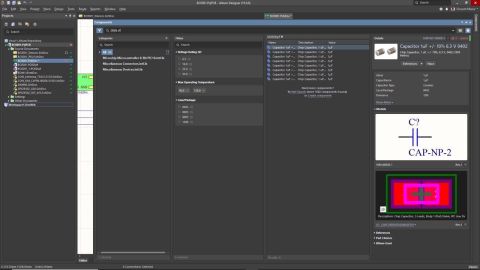
A unified PCB design environment offers all of your design tools in a single program and links your design tools directly to extensive component libraries. Diagnosing signal integrity and accurately mapping your power distribution requires a powerful simulation engine that interfaces with a unified component model. Your simulation and verification tools are present in the same interface and are built using the same rules-driven engine, ensuring consistent data communication between design features.
Inspecting power and signal integrity in your device is easy when your simulation tools are instantly accessible within your design software. But verifying the thermal conductivity and functionality of your thermal interface material design takes more than good simulators. You’ll need to check your design against standardized and custom design rules. Altium Designer gives you access to all the design, simulation, and verification features you need to get the best results within a unified design environment.
Spot Thermal Trouble Spots in Your PCB with Altium Designer
Many thermal problems result from IR loss in traces, pads, thermal paste, and components. These problems can be diagnosed with the right simulation tools. PDN analysis helps you spot IR losses throughout your PCB. These losses are difficult to identify with most simulators, so Altium Designer places this information into a visual interface. You can easily spot problem areas in your PCB and make modifications as necessary.
Altium Designer is the only PCB design package that places all these critical features and more in a single unified interface. Forget about switching between multiple programs just to get your PCB design off the ground. You’ll have everything you need to design schematics, layout your board, identify thermal pad problems, understand where to place thermal grease or a thermal gap pad, and verify functionality through rules checks. Once your design passes muster, you’ll be able to generate deliverables for your manufacturer in standard formats.
- The unified environment in Altium Designer gives you access to all the design features you need within a single program. Learn more about the unified environment in Altium Designer.
- All of the design tools in Altium Designer are built on the same rules-driven design engine. This allows your design tools to communicate in the same language and prevents data errors that cripple other design platforms.
Learn more about the rules-driven design engine in Altium Designer.
- More PCBs are operating at high speeds, increasing the complexity of design constraints, thermal conductivity, and simulation requirements. Altium Designer has a host of tools to help you efficiently design high-speed devices. Learn more about high-speed design in Altium Designer.
Other design platforms claim to offer unified feature sets, but you’ll still have to move between modules just to perform design tasks and thermal conductivity testing. Altium Designer is the only platform that offers all of your design, verification, and simulation tools in a single interface. Working with the best design environment helps you build the best PCBs and verify their functionality. Save time and money by avoiding faulty PCBs and know where to place your thermal pads or thermal paste with confidence.
If you’re unfamiliar with unified design software, Altium Designer has dedicated support teams and resources to help you get started and support you throughout your journey. You’ll have access to plenty of resources like the AltiumLive forum, podcasts and webinars from PCB design experts, and an extensive knowledge base with design tips. You’ll also have access to example designs and tutorials that show you how to get started using different features.
You can save yourself a huge amount of time and ensure that your PCB will operate as designed when all your critical design tools are built to work together in a single program. The tools in Altium Designer are built on top of a rules-driven design engine. You can rest easy knowing your next PCB will meet or exceed critical industry standards for your application. It’s time to try Altium Designer.

关于作者
Related Technical Documentation
相关资源
目录
Solutions for Every Role and Team
- Discover and evaluate design options earlier
- Develop in one shared workspace
- Scale with control and compliance
- Connect every stage of hardware development
Learn More
Thank you, you are now subscribed to updates.






 沪公网安备 31010502006411号