
Mobile menu
  • Altium Develop
  • 资源 & 支持中心
    Altium 365 免费工具
    • Gerber Compare
    • 在线 PCB 查看器
    了解产品
    • 下载
    • 联系我们
    • 关注微信
      • 扫描二维码
        关注Altium微信平台
    资源 & 支持中心
    • 用户指南
    • 实战讲堂
    • 学习中心
    • 技术文档
    • 支持中心
    • Altium Develop 常见问题集
    Altium 社群
    • 社群
    • Bug提交
    • 创意
  • 教育
    • 学生实验室 Free access to professional PCB design software, training, and learning resources for students
    • 教育者中心 A comprehensive education platform providing curriculum, software, training, and classroom resources for educators
    • Altium 教育课程 Free college- and university-level PCB design curriculum designed to prepare students for real-world engineering careers
  • Search Open
    Search Close
登录
网络研讨会

Main menu

  • 首页
  • PCB设计
    • 团队协作
    • 元器件创建
    • PCB数据管理
    • PCB设计输出和文档
    • ECAD/MCAD
    • HDI设计
    • 高速设计
    • 多板设计
    • PCB布局
    • PCB布线
    • PCB供应链
    • 电源完整性
    • RF设计
    • 刚柔结合板PCB设计
    • 原理图输入
    • 信号完整性
    • PCB设计仿真/分析
  • 软件
    • Develop
    • Discover
    • Agile
    • Altium的365
    • Altium Designer的
  • 资源中心
    • 项目
    • Altium Academy
    • 工程新闻
    • 指南书
    • 新闻通讯
    • 播客
    • 项目
    • 培训课程
    • 网络研讨会
    • 白皮书
首页 网络研讨会 BOM Portal 如何在整个产品生命周期中通过 DFM 与 DFC 分析支持研发与采购

BOM Portal 如何在整个产品生命周期中通过 DFM 与 DFC 分析支持研发与采购

在当今世界,供应链中断不仅会影响您已完成设计并进入制造阶段的产品,还会影响您下一代产品及早期原型的设计决策。

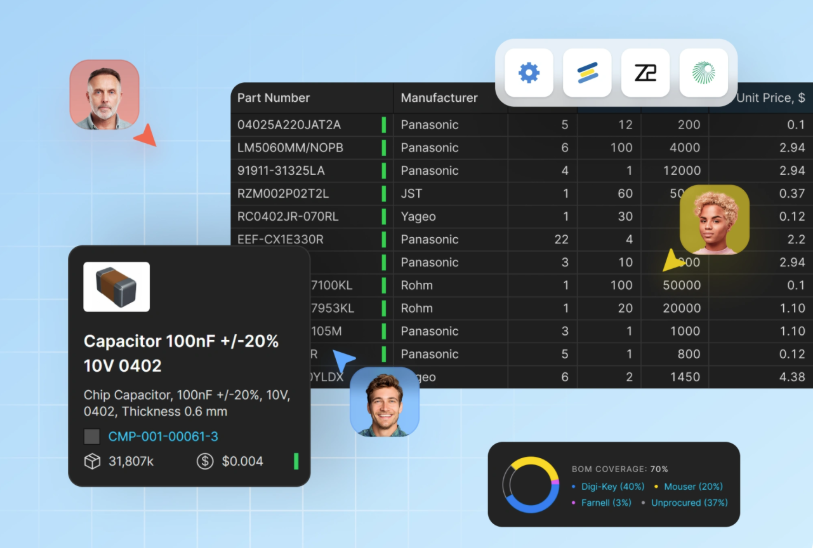
欢迎参加本次实操演示,了解研发团队如何借助共享 BOM 项目,在产品设计初期直至整个产品生命周期中降低供应链风险。您还将了解采购团队如何在协作式 BOM 项目中借助更丰富的元器件信息,为研发团队在整个产品生命周期内提供支持,并与管理层共享采购洞察以降低风险。

您将学到什么 

  • BOM 项目创建: 
    基于电子表格信息,为已设计完成的传统产品创建 BOM 项目;或者基于协作 Workspace 中新发布的原型项目,创建受管控的 BOM 项目。 

  • 供应链情报: 
    利用可用资源,在统一界面中为项目补充元器件生命周期、合规性、价格和库存数据,并解决缺失的制造商料号问题。 

  • 影响分析与风险缓解: 
    利用自动化问题检测查找停产器件,可靠地寻找替代料,并优化您的 BOM,以尽量减少供应商数量,从而简化订购流程并降低成本。 

  • 简化元器件采购: 
    定义您偏好的供应商,并根据当前可用性调整器件选择,以实现高效的原型和量产采购。 

  • 生产计划: 
    通过 YTEOL 和工厂交期识别即将到来的采购风险。提前应对 BOM 项目或合并 BOM 项目中的供应链中断,从而优化公司整体的元器件决策。 

  • 生命周期管理:  
    在完整的产品生命周期中持续更新您的 BOM 项目,并从首个原型阶段到制造阶段发布各个里程碑,同时在产品开发过程中为所有协作者跟踪变更。 

为什么参加? 

  • 了解自动化数据补充如何免去数小时的手动元器件调研工作,从而识别停产器件及其直接替代件  

  • 了解研发工程师如何通过与采购团队共享的协作式 BOM 项目,在整个开发过程中获益 

  • 了解采购团队如何从原型到制造阶段影响元器件决策,并与管理层分享他们的洞察 

  • 帮助您了解公司整体产品的采购状况 

  • 在现场问答环节直接向专家提问 

谁应该参加? 

  • PCB 设计师和电子工程师希望加快从设计发布到可运行原型的进程,而无需手动清理 BOM。 

  • 采购专员和采购人员希望获得精简且数据丰富的 BOM 工作流程,以减少供应商调研和订购管理开销。 

  • NPI 与原型工程师负责快速、准确地完成首件制造。 

  • 工程经理和团队负责人希望减少设计完成到原型验证之间所耗费的时间和返工。 

  • 任何曾在从原型阶段到生产或后续阶段过程中遭遇延期、BOM 错误或供应链中断的硬件团队 
 

BOm Portal

Registration has recently closed. Check back soon for on-demand webinar.

Related Technical Documentation

Altium 365 Platform Interface Altium 365 Platform Interface

Depending on your relationship with Altium, the services offered on the Altium Platform will be experienced from within Altium Designer and through the platform's browser-based interface. This page takes a look at the latter and provides an overview of what you'll see when you register an Altium Account and sign in to the Altium Platform Interface. For the latest information on the security,…

阅读文档
FAQs FAQs

For additional answers to the questions you may have in relation to Altium 365, take a look at the Altium Knowledge Base, whose content is curated based on support questions fielded each and every day. General How is my design data protected on Altium 365? Please visit the Altium 365 Trust Center, which connects you to the latest information on the security, reliability, privacy, and compliance…

阅读文档
Altium 365 Personal Space Altium 365 Personal Space

As a registered user of the Altium 365 Platform (i.e. an Altium Account) you have your own Altium 365 Personal Space, which is accessible only by you. Your Personal Space accommodates persistent storage of various types of uploaded static data, including design 'snapshots' (from various ECAD platforms) and Gerber/ODB++ manufacturing data, with the ability to share with anyone for comments and…

阅读文档
Web Viewer Web Viewer

The Altium 365 Web Viewer interface provides universal access to PCB project documents through a standard web browser. Much more than just a web-based viewer, its advanced browser technology allows users to navigate through the project structure, interact with design documents, extract information about elements in the design, and highlight areas or objects for commenting notes. When viewing…

阅读文档
Search Query Reference Search Query Reference

This document is a reference guide for the syntax, operators, and conventions used in the Workspace hardware design search language. Search queries are based on a familiar field:value syntax, and can be used to perform quick, simple searches through to constructing powerful and precise queries. See Web Viewer Search for related usage information. Search Syntax and Guide The below reference…

阅读文档
Global Sharing of Data Global Sharing of Data

One of the most powerful aspects of the Altium 365 infrastructure platform is its support for collaboration on a global scale. At the heart of this is the platform's support for Global Sharing. With Altium 365, you can effortlessly share your current design progress with management, or purchasing, or a potential manufacturer, in a way that is also easy for them – simplified, interactive…

阅读文档
Electronic System Design Electronic System Design

In early stages of electronic designs, it is important to define the design on the conceptual/functional level. This initial step serves as a crucial foundation for the entire development process, providing a high-level overview of the system's architecture and its primary elements. A well-crafted block diagram clarifies the major functional units of the electronic system and illustrates their…

阅读文档
Renesas 365 Renesas 365

Renesas 365, powered by Altium, is built on the Altium 365 platform and developed for electronics system design. It liberates engineers by unifying development workflows to improve efficiency and accelerate design cycles from concept to volume production. The main, high-level entity in Renesas 365 is a Solution that unifies different aspects of the system that you create – system design, software…

阅读文档
Viewers Troubleshooting Guide Viewers Troubleshooting Guide

To ensure a smooth experience with Altium 365 Viewer and the Web Viewer interface within the Altium 365 platform itself, ensure you have: The latest version of a supported Web Browser installed. That WebGL (or WebGL 2.0) is enabled for it. That the option to use 'Hardware Acceleration' is enabled for your browser where available. This will typically result in a far smoother viewing experience,…

阅读文档
Viewing Manufacturing Packages Viewing Manufacturing Packages

The Manufacturing Package Viewer, an element of the Altium 365 platform's Global Sharing support, allows invited stakeholders to view a manufacturing package from any web browser – anywhere in the world – but outside of your Workspace, so that your designs themselves and other valuable IP are kept off limits. The Viewer opens in its own browser tab and provides a summary overview of the design,…

阅读文档

相关资源

47:55 ECAD-MCAD CoDesign with Altium 365 & SOLIDWORKS MCAD CoDesigner allows for seamless collaboration between electrical and mechanical domains and has the exact fit and form factor of your printed circuit board and enclosure. It aids in the ease of adding essential features, such as Holes, Cutouts, Keep-outs, and Placement of Components, through a ribbon panel to your design while keeping it secure in the Altium 365 cloud-based server. Using the built-in version control for your project data and 观看视频
33:27 Easily Realize Complex PCB Documentation with Draftsman - EN - Webinar - EMEA - ADSCvid . 观看视频
00:33:23 通过敏捷团队 + Duro 消除从设计到生产的鸿沟 了解 Agile Teams 和 Duro PLM 如何通过互联、系统驱动的方法,统一设计与生产工作流程。 观看视频
35:34 New Experiences of Part and Library Component Search 观看视频
48:22 Altium Designer 19 先睹为快 观看视频
35:23 Altium 365: Real-Time Sharing and Collaboration Whether you are an individual designer or a team of people, there are always others in the value chain that you rely on to turn your design from intent to reality. Making this happen means you have to collaborate and share. One of the problems is that the way this is done today can be cumbersome, error-prone and inefficient — we haven’t progressed much beyond phone calls and emails, until now. Watch an on-demand webinar by Altium’s Chief Software 观看视频
43:14 Altium 365: ECAD-MCAD Collaboration Pretty much every printed circuit board assembly ends up in some kind of mechanical enclosure or fixed to a chassis, making collaboration between the ECAD and MCAD domains critical to success. People thought we were crazy when we changed the industry with a 3D PCB editor. Eventually, our competitors tried their best to duplicate this industry-first innovation. Watch an on-demand webinar to learn how Altium 365 will change the industry yet again 观看视频
41:02 Altium 365: Release to Manufacturing 观看视频
28:11 Using Version Control in Your PCB Project Webinar Version control has been a staple of software development for decades, but hardware development can benefit just as much from a version control system (VCS). Traditionally, VCS has been managed locally tying you down to a workplace, but advances in cloud technology have removed that limitation. Learn how Altium 365 cloud technology enables working concurrently on designs with built-in version control and evaluate its advantages: Overview of 观看视频
27:22 Session 1 - Altium 365 - Collaborating with your other company personnel Altium is pleased to offer a 3 part Altium Academy Virtual series to discuss the problems that companies can encounter while working remotely, and how to effectively overcome these issues. During these 3 webinars, we’ll show how engineering teams working remotely can effectively collaborate to solve critical issues. How to collaborate from multiple locations with colleagues from your organization. How to collaborate with 3rd party companies or 观看视频

BOM Portal 如何在整个产品生命周期中通过 DFM 与 DFC 分析支持研发与采购

已创建:May 18, 2026
At a Glance
了解共享 BOM 项目如何帮助研发与采购团队更高效地协作。
Go Deeper with AI:
ChatGPT Perplexity Claude Google Grok
5 videos
  • Hosted by Konstantin Arnold - Field Application Engineer
    00:34:09 • Jun 3, 2026
    Hosted by Konstantin Arnold - Field Application Engineer
    00:34:09 • Jun 3, 2026

    Explore how shared BOM projects help R&D and procurement teams collaborate more effectively.

  • Présenté par Majdi Thouabtia - Field Application Engineer
    00:51:14 • Jun 3, 2026
    Présenté par Majdi Thouabtia - Field Application Engineer
    00:51:14 • Jun 3, 2026

    Participez à notre atelier pratique et découvrez la façon dont les équipes R&D exploitent les projets BOM collaboratifs pour anticiper et réduire les risques d'approvisionnement.

  • Präsentiert von Konstantin Arnold - Field Application Engineer
    00:37:12 • Jun 3, 2026
    Präsentiert von Konstantin Arnold - Field Application Engineer
    00:37:12 • Jun 3, 2026

    Nehmen Sie an unserer praxisorientierten Präsentation teil und erfahren Sie, wie F&E-Teams von gemeinsamen Stücklistenprojekten profitieren können.

  • Presentato da Francesco Cecchetti - Field Application Engineer
    00:45:01 • Jun 3, 2026
    Presentato da Francesco Cecchetti - Field Application Engineer
    00:45:01 • Jun 3, 2026

    Unisciti a noi per una dimostrazione pratica su come i team di ricerca e sviluppo possano trarre vantaggio dai progetti di distinta base condivisa per ridurre i rischi.

  • Presentado por Natalia Coria Perez - Field Application Engineer
    00:36:52 • Jun 3, 2026
    Presentado por Natalia Coria Perez - Field Application Engineer
    00:36:52 • Jun 3, 2026

    Acompáñanos en esta sesión práctica sobre cómo los equipos de I+D pueden beneficiarse de proyectos BOM.

Product: Agile Teams 敏捷 网络研讨会 PCB 设计工程师 电气工程师 材料博客的比尔 设计输出 Manufacturing Outputs and Compliance
Other Recordings
清除 ×
Region
语言

在当今世界,供应链中断不仅会影响您那些已经完成设计并进入制造阶段的产品,还会影响下一代产品及早期原型的设计决策。

欢迎参加本次实操演示,了解研发团队如何通过共享 BOM 项目,在产品设计初期到整个产品生命周期中降低供应链风险。您将学习采购团队如何在协作式 BOM 项目中借助更丰富的元器件信息,为研发团队在整个产品生命周期内提供支持,并与管理层分享采购洞察以降低风险。

您将学到什么 

  • BOM 项目创建: 
    基于电子表格信息,为已设计完成的现有传统产品创建 BOM 项目;或者基于您协作 Workspace 中新发布的原型项目,创建受管理的 BOM 项目。 

  • 供应链情报: 
    利用可用资源,在统一界面中为您的项目补充元器件生命周期、合规性、价格和库存数据,并解决缺失的制造商料号问题。 

  • 影响分析与风险缓解: 
    使用自动化问题检测来发现停产元器件,找到可靠的替代料,并优化您的 BOM,以尽可能减少供应商数量,从而简化订购流程并降低成本。 

  • 简化元器件采购: 
    定义您偏好的供应商,并根据当前可用性调整元器件选择,以实现高效的原型和生产采购。 

  • 生产规划: 
    通过 YTEOL 和工厂交期识别即将到来的采购风险。提前掌握 BOM 项目或汇总 BOM 项目中的供应链中断风险,从而优化公司整体的元器件决策。 

  • 生命周期管理:  
    在完整的产品生命周期内更新您的 BOM 项目,并从首个原型阶段到制造阶段发布各个里程碑,同时在产品开发过程中为所有协作者跟踪变更。 

为什么参加? 

  • 了解自动化数据补充如何消除数小时的手动元器件调研工作,以识别停产元器件及其直接替代料  

  • 了解研发工程师如何通过与采购团队共享的协作式 BOM 项目,在整个开发过程中获益 

  • 了解采购团队如何从原型阶段到制造阶段影响元器件决策,并与管理层分享他们的洞察 

  • 帮助您理解公司整体产品的采购现状 

  • 在现场问答环节直接向专家提问 

谁适合参加? 

  • PCB 设计人员和电子工程师:希望加快从设计发布到可用原型的进程,无需手动清理 BOM。 

  • 采购专员和采购人员 :希望采用精简、数据更丰富的 BOM 工作流程,以减少供应商调研和订购管理负担。 

  • NPI 和原型工程师 :负责快速、准确地完成首件样品制造。 

  • 工程经理和团队负责人 :希望减少设计完成到原型验证之间的时间和返工。 

  • 任何在从原型阶段走向量产或更后续阶段时经历过延期、BOM 错误或供应链中断的硬件团队 

Author

Author

Majdi Thouabtia’s background is in electrical engineering, with several years of experience in hardware development and technical project management. He has worked across the full hardware lifecycle, from EMC-compliant circuit design and PCB layout to prototyping, testing, and production. Throughout my career, Altium Designer has been a key tool in his daily work, so he is especially proud to now be part of the team behind it.

Before joining Altium, he contributed to projects in the EV charging and IoT sectors, leading development efforts and collaborating with cross-functional teams and external partners. He holds a Master’s degree in Electrical Engineering from FAU Erlangen-Nürnberg.

More content by Majdi Thouabtia

Author

Author

Konstantin is a Field Applications Engineer (FAE) at Altium and holds a B.Eng.(EE) and a M.Sc.(SEEM) in electronics and is based in Soest, Germany. He is a technical enthusiast with a passion for Electrical and Electronic Design with 10+ years industry experience in R&D, NPI, Product Definition for semiconductors, embedded systems, power electronics, Inverter, SMPS and industrial measurement systems. As an Altium user from the beginning of his career, he appreciates a lean PCB design workflow for High Speed Designs, MCAD/FEM Integration and Supply Chain handling to accelerate design cycle times with outstanding quality at the same time. He is always passionate about innovative technical problems that challenge the status quo, can classify them within the project/company framework and strive for practical & customer-oriented solutions that offer added value for society.

More content by Konstantin Arnold

Author

Author

Francesco holds a Master's degree in Electrical Engineering from EPFL, Switzerland. He is currently part of the Field Applications Engineering team at Altium. During his studies, his primary focus was on bioelectronics and the microfabrication of biomedical implants. After graduating, Francesco transitioned into a technical sales role with a global supplier and manufacturer of custom magnetics, where he was responsible for both technical and sales discussions, serving as the liaison between design engineers, manufacturing engineers, and customers.

More content by Francesco Cecchetti

Author

Author

Natalia holds a Master’s in Electronic Design and brings nearly 15 years of experience in hardware design, testing, and field applications engineering. Her expertise includes high-level hardware architecture, schematic capture, board bring-up, and debugging. Comfortable in the lab and in customer-facing roles, Natalia has spent the last three years providing technical guidance in PCB and 3D design for Additive Manufactured Electronics (AME). Her role includes pre and post sales support, along with onboarding training for new users.

More content by Natalia Coria Perez

Related Technical Documentation

Altium 365 Platform Interface Altium 365 Platform Interface

Depending on your relationship with Altium, the services offered on the Altium Platform will be experienced from within Altium Designer and through the platform's browser-based interface. This page takes a look at the latter and provides an overview of what you'll see when you register an Altium Account and sign in to the Altium Platform Interface. For the latest information on the security,…

阅读文档
FAQs FAQs

For additional answers to the questions you may have in relation to Altium 365, take a look at the Altium Knowledge Base, whose content is curated based on support questions fielded each and every day. General How is my design data protected on Altium 365? Please visit the Altium 365 Trust Center, which connects you to the latest information on the security, reliability, privacy, and compliance…

阅读文档
Altium 365 Personal Space Altium 365 Personal Space

As a registered user of the Altium 365 Platform (i.e. an Altium Account) you have your own Altium 365 Personal Space, which is accessible only by you. Your Personal Space accommodates persistent storage of various types of uploaded static data, including design 'snapshots' (from various ECAD platforms) and Gerber/ODB++ manufacturing data, with the ability to share with anyone for comments and…

阅读文档
Web Viewer Web Viewer

The Altium 365 Web Viewer interface provides universal access to PCB project documents through a standard web browser. Much more than just a web-based viewer, its advanced browser technology allows users to navigate through the project structure, interact with design documents, extract information about elements in the design, and highlight areas or objects for commenting notes. When viewing…

阅读文档
Search Query Reference Search Query Reference

This document is a reference guide for the syntax, operators, and conventions used in the Workspace hardware design search language. Search queries are based on a familiar field:value syntax, and can be used to perform quick, simple searches through to constructing powerful and precise queries. See Web Viewer Search for related usage information. Search Syntax and Guide The below reference…

阅读文档
Global Sharing of Data Global Sharing of Data

One of the most powerful aspects of the Altium 365 infrastructure platform is its support for collaboration on a global scale. At the heart of this is the platform's support for Global Sharing. With Altium 365, you can effortlessly share your current design progress with management, or purchasing, or a potential manufacturer, in a way that is also easy for them – simplified, interactive…

阅读文档
Electronic System Design Electronic System Design

In early stages of electronic designs, it is important to define the design on the conceptual/functional level. This initial step serves as a crucial foundation for the entire development process, providing a high-level overview of the system's architecture and its primary elements. A well-crafted block diagram clarifies the major functional units of the electronic system and illustrates their…

阅读文档
Renesas 365 Renesas 365

Renesas 365, powered by Altium, is built on the Altium 365 platform and developed for electronics system design. It liberates engineers by unifying development workflows to improve efficiency and accelerate design cycles from concept to volume production. The main, high-level entity in Renesas 365 is a Solution that unifies different aspects of the system that you create – system design, software…

阅读文档
Viewers Troubleshooting Guide Viewers Troubleshooting Guide

To ensure a smooth experience with Altium 365 Viewer and the Web Viewer interface within the Altium 365 platform itself, ensure you have: The latest version of a supported Web Browser installed. That WebGL (or WebGL 2.0) is enabled for it. That the option to use 'Hardware Acceleration' is enabled for your browser where available. This will typically result in a far smoother viewing experience,…

阅读文档
Viewing Manufacturing Packages Viewing Manufacturing Packages

The Manufacturing Package Viewer, an element of the Altium 365 platform's Global Sharing support, allows invited stakeholders to view a manufacturing package from any web browser – anywhere in the world – but outside of your Workspace, so that your designs themselves and other valuable IP are kept off limits. The Viewer opens in its own browser tab and provides a summary overview of the design,…

阅读文档

相关资源

47:55 ECAD-MCAD CoDesign with Altium 365 & SOLIDWORKS MCAD CoDesigner allows for seamless collaboration between electrical and mechanical domains and has the exact fit and form factor of your printed circuit board and enclosure. It aids in the ease of adding essential features, such as Holes, Cutouts, Keep-outs, and Placement of Components, through a ribbon panel to your design while keeping it secure in the Altium 365 cloud-based server. Using the built-in version control for your project data and 观看视频
33:27 Easily Realize Complex PCB Documentation with Draftsman - EN - Webinar - EMEA - ADSCvid . 观看视频
00:33:23 通过敏捷团队 + Duro 消除从设计到生产的鸿沟 了解 Agile Teams 和 Duro PLM 如何通过互联、系统驱动的方法,统一设计与生产工作流程。 观看视频
35:34 New Experiences of Part and Library Component Search 观看视频
48:22 Altium Designer 19 先睹为快 观看视频
35:23 Altium 365: Real-Time Sharing and Collaboration Whether you are an individual designer or a team of people, there are always others in the value chain that you rely on to turn your design from intent to reality. Making this happen means you have to collaborate and share. One of the problems is that the way this is done today can be cumbersome, error-prone and inefficient — we haven’t progressed much beyond phone calls and emails, until now. Watch an on-demand webinar by Altium’s Chief Software 观看视频
43:14 Altium 365: ECAD-MCAD Collaboration Pretty much every printed circuit board assembly ends up in some kind of mechanical enclosure or fixed to a chassis, making collaboration between the ECAD and MCAD domains critical to success. People thought we were crazy when we changed the industry with a 3D PCB editor. Eventually, our competitors tried their best to duplicate this industry-first innovation. Watch an on-demand webinar to learn how Altium 365 will change the industry yet again 观看视频
41:02 Altium 365: Release to Manufacturing 观看视频
28:11 Using Version Control in Your PCB Project Webinar Version control has been a staple of software development for decades, but hardware development can benefit just as much from a version control system (VCS). Traditionally, VCS has been managed locally tying you down to a workplace, but advances in cloud technology have removed that limitation. Learn how Altium 365 cloud technology enables working concurrently on designs with built-in version control and evaluate its advantages: Overview of 观看视频
27:22 Session 1 - Altium 365 - Collaborating with your other company personnel Altium is pleased to offer a 3 part Altium Academy Virtual series to discuss the problems that companies can encounter while working remotely, and how to effectively overcome these issues. During these 3 webinars, we’ll show how engineering teams working remotely can effectively collaborate to solve critical issues. How to collaborate from multiple locations with colleagues from your organization. How to collaborate with 3rd party companies or 观看视频
返回主页
Altium Agile Teams

Speed at Scale. Structured Repeatability. Secure Flexibility.

  • Start up fast with out‑of‑the‑box workflows
  • Collaborate using ECAD‑MCAD codesign tools
  • Manage BOMs with live supply chain part data
  • Manage access and security as teams scale

Contact Us

Altium Agile Teams
Speed at Scale. Structured Repeatability. Secure Flexibility.

 A unified platform for advanced multidisciplinary collaboration

Learn More
工具 & 平台
  • Altium Designer
  • Altium 365
平台解决方案
  • Altium Develop
  • Altium Agile Enterprise
公司
  • 我们的客户
  • 新闻中心
产品扩展
  • 所有扩展插件
  • Requirements Management
  • Electronics Data Management
  • IT Security
  • Electronics Manufacturing
  • Electronics Supply Chain
  • Engineering Management
联系我们
  • 中国大陆
  • 中国台湾/香港/澳门
资源库 & 支持中心
  • 状态
  • 下载
  • 所有资源
  • 支持中心
  • Bug提交
  • 社群
  • 文档
  • 创意
  • 教育
  • 专业培训/认证
  • 官方直播
  • Beta 项目
教育项目
  • 学生实验室
  • 教育者中心
  • Altium 教育课程
工作机会
  • 开放职位
  • 版权和商标
  • 隐私政策
  • Cookie 政策
  • 使用条款
  • 法律声明
  • 沪公网安备 31010502006411号
  • 沪ICP备12028795号-1
© 2026 Altium Pty. Ltd.