Altium & Digi-Key - A Partnership That Brings Value to the Designer

Here’s why you should use Digi-Key in PCB design to source your components. Altium and Digi-Key are working together for convenient component sourcing.


Whether you’re looking for technical specifications while designing, or sourcing parts for manufacturing, you can access component data and inventory from Digi-Key Electronics directly through Altium Designer and Octopart. Altium has partnered with Digi-Key to give PCB designers seamless access to Digi-Key’s broad line card. Here’s how you can take advantage of this partnership to help streamline design, sourcing, purchasing, and manufacturing for your next PCB.
Altium and Digi-Key are working together to make design, sourcing, and purchasing easier for PCB design teams. Take advantage of the Digi-Key BOM import to Altium Designer.
Engineering and board layout are crucial and obvious aspects of PCB design, but sourcing components and finding parts replacements can be time-consuming tasks. When you don’t have a dedicated sourcing specialist or the right supply chain tools, you may be forced to manually source data, part numbers, and CAD models for your new design. Altium and Digi-Key have teamed up to create a single environment to design and check inventory: use Altium Designer or A365 to design your PCB, create your BOM, and confirm inventory availability. When your design is ready for production, upload your Altium BOM via Digi-Key’s BOM Manager to quickly create a new component order. From initial design to manufacturing, take advantage of supply chain integration between Altium and Digi-Key to help you stay productive.
Access Parts Data from Digi-Key in Altium Designer
Unless you’re starting a new board from a reference design or upgrading an old project, you need to select all your parts from scratch. Not only will this require finding parts that meet the form, fit, and function required, with models that can be imported to your design, you need to ensure your parts will be sourceable and can be quickly added to your layout. Any parts you add to your PCB layout need to include the following information:
- CAD models, including 3D STEP files for MCAD integration
- Sourcing information, including manufacturer part numbers and distributor SKUs
- A short summary of technical specifications
With more than 1,000,000 components ready for immediate shipment from Digi-Key’s headquarters, there are no lead times for in-stock products. Thanks to integration with Digi-Key, Altium users can leverage an industry leading component database for new designs, and verify stock on critical parts directly within Altium Designer and Octopart.
How Digi-Key Component Sourcing Brings Value to Altium Designer Users
If you want to quickly find, place, and source components for your design, the best way is to use the sourcing and purchasing tools in Digi-Key, Octopart, and Altium Designer. Altium is already an industry leader in PCB design software, and Altium’s partnership with Digi-Key is critical to creating more value for Altium Designer and Octopart Users.
- Verified component data: Thanks to Digi-Key's component sourcing database and Altium Designer’s component search features, designers can efficiently select the parts they need.
- Accurate manufacturing documentation: Altium Designer helps expedite the manufacturing process by instantly creating documentation for components. When a BOM is being created, Altium users can select Digi-Key as their favorite supplier in the ActiveBOM tool in Altium Designer.
- Streamlined purchasing: When you’re ready to create your parts order, simply go to Digi-Key and upload your Altium BOM. Digi-Key also provides manufacturing quotes, test equipment, and much more to help designers go to production quickly.
Altium’s partnership with Digi-Key streamlines PCB design, sourcing, purchasing, and manufacturing; allowing you to focus on designing a great PCB layout.
- When supply chain tools and CAD data are accessible in your PCB design software, you won’t have to navigate multiple data sources or manually create components models.
Learn more about leveraging component data in your PCB design software.
- Digi-Key’s unmatched inventory gives designers access to a breadth of technologies with fast and reliable procurement. Thanks to Digi-Key’s partnership with Altium, designers can navigate component shortages with ease.
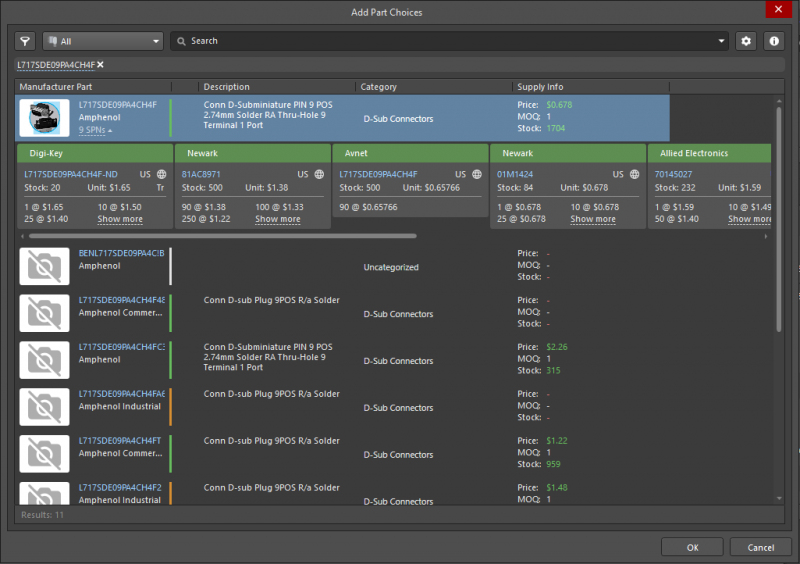
Get the best prices and accurate parts data directly from Digi-Key component sourcing using the ActiveBOM utility in Altium Designer.
How Integration with Digi-Key Helps You Stay Productive
Digi-Key Helps You Find a Manufacturer
Altium Designer already makes the Digi-Key BOM import preparation process easy. Once you’ve created your Gerbers in Altium Designer, you can import your files into Digi-Key’s PCB Builder Tool to get a manufacturing price comparison from local and overseas partners. Digi-Key’s PCB Builder gives you several fabrication options from reputable manufacturers with visibility on prices and lead times. By streamlining the shopping process, Altium Designer users can focus on making great PCB designs and worry less about getting to manufacturing.
- Your board can’t be built without manufacturing documentation. Altium Designer lets you generate your fabrication and assembly deliverables in standard file formats to help you get to manufacturing quickly.
Learn more about how fabricators use manufacturing documentation.
- Altium’s sourcing tools and Digi-Key’s PCB Builder help you create cost estimates for your PCBs and stay within your budget.
Learn more about creating a manufacturing cost estimation for your PCB.
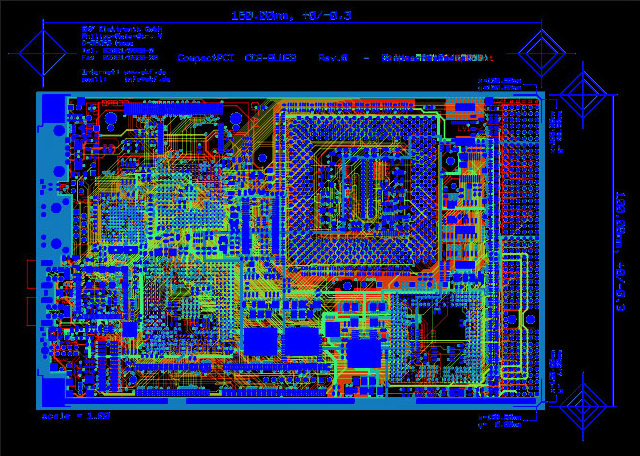
Once you export your Gerbers from Altium Designer, you can import them into Digi-Key and get a rough manufacturing estimate for your design.
Use Altium Designer + Digi-Key Component Sourcing to Find Components
Altium Design is already the industry leading PCB design solution thanks to its powerful layout and routing tools. Now, thanks to integration with Digi-Key, designers can also access critical supply chain information that helps get a design into production quickly. Altium and Digi-Key have joined forces to create the perfect design and sourcing ecosystem. You can search by part number or spec, import parts into your design with Altium Designer and Altium 365, and instantly convert your BOM into a purchase order with Digi-Key’s eCommerce site.
Instantly Source From Digi-Key in Altium Designer
Once you select Digi-Key as your favorite supplier in Altium Designer and Altium 365, their inventory and price information will be automatically populated in your finalized Digi-Key BOM import. Integration between Altium Designer and Digi-Key's component sourcing provides the most streamlined design, sourcing, and purchasing process for PCB designers.
- Altium Designer gives casual and professional designers the same set of PCB design and sourcing tools. Designers can accurately place and route components in their PCB layout and prepare full documentation packages for manufacturing.
Learn more about the PCB design environment in Altium Designer.
- Once you’re ready to share your new design with your manufacturer, you can give your fabricator instant access through the Altium 365 platform. Your manufacturer will see all sourcing data for the components in your BOM.
Learn more about PCB design collaboration in the cloud with Altium 365.

With Octopart, Altium Designer, and Digi-Key/s component sourcing, you can create a high-quality layout that is fully sourceable and manufacturable.
In Altium Designer and on Altium 365, you can quickly import parts to your schematics and PCB layout. In partnership with Digi-Key, these platforms help you minimize supply chain risks while designing by giving you real-time inventory availability. Stay ahead of parts shortages, thanks to Digi-Key’s integration with Altium Designer.
Altium Designer on Altium 365 allows designers to work from home and reach unprecedented levels of efficiency.
We have only scratched the surface of what is possible with Altium Designer on Altium 365. You can check the product page for a more in-depth feature description or one of the On-Demand Webinars.








 沪公网安备 31010502006411号