









Use Supply Chain Tools in Altium Designer When You Need a PCB Assembly Cost Calculator


Anytime you need to prepare a new design and plan a production run, it’s important to work up an estimate for design, PCB fabrication, assembly, shipping, components, and any other portions of a project. There is a lot that goes into any project and it needs to be planned out early in order to prevent cost overruns. Some designers looking for manufacturing services and component prices might be tempted to use an online calculator, but this is risky as these tools are not always accurate.
Instead of searching distributor websites and using an inaccurate PCB cost calculator, you can get accurate component price data with the supply chain tools in Altium Designer. The supply chain utilities in Altium Designer give you a simple but powerful way to look into the electronics supply chain and get sourcing data for components. Altium Designer does much more than help you develop a PCB cost estimate, it contains the industry’s best set of circuit board design features in a single program.
ALTIUM DESIGNER®
The industry’s only design application that helps prepare for manufacturing and source components without a PCB cost calculator.
It can sometimes be tough to estimate the cost of a new product and many designers will look to an online PCB cost calculator to help them develop per-board price estimates. Costs include design, fabrication, assembly, and components, and no designer can control every factor that drives the cost of a new design. However, when a design team can access costs for components, they can take control of a major cost driver in their new product.
Once a design team can access component costs across the supply chain, they won’t have to react to price changes, long lead times, and obsolete components. The complete set of supply chain features in Altium Designer do all this and much more; they give a design team the tools they need to select the right mix of components to minimize price while still meeting their design goals. Here’s how Altium Designer takes the place of a PCB cost calculator and helps teams quickly get designs into manufacturing with maximum savings on cost.
What Drives the Cost of a New PCB?
There are many factors that drive the cost of a new PCB, and not all of these costs are in the designer’s control. Some of these costs are set by fabricators and assemblers, and some costs are set by component distributors. Designers that want to use a PCB cost calculator should understand what are the major cost drivers of a PCB. These are:
- Design time
- Component counts and prices
- Fabrication costs and lead times
- Assembly services
- NRE costs from a fabricator and assembler
- PCB substrate materials and consumables costs
- Board size, layer count, and drill hole count
Among all of these costs, there is no single formula for figuring out the exact cost of any PCB. Some fabricators have widgets on their website you can use to estimate board fabrication costs. However, with supply chain visibility features, designers can get accurate component costs and determine the best components to use in their designs.
Supply Chain Visibility in Altium Designer Aids Design-to-Cost
With the supply chain features in Altium Designer, a design team can use information from across the supply chain to find the best prices on components and choose parts for their new design. No other PCB design platform provides this much information to designers, and no other application integrates offers supply chain visibility alongside the industry’s best design features.
Altium Designer has taken a major step forward in supply chain management by aggregating data from multiple distributors into a single location. The Manufacturer Part Search panel helps you find components with verified footprints and electrical specifications to add into schematics and a PCB layout, and the components can be instantly downloaded into your component libraries. Best of all, aggregate pricing data, MOQs, and stocks are visible directly in this utility, which helps designers determine the best balance between price, MOQ, and electrical performance.
- The supply chain information available in Altium Designer helps a design team develop a manufacturing cost estimate early in the design process.
Learn more about creating a PCB manufacturing cost estimate.
- An important part of a design review is spotting components that can be combined to take advantage of price breaks, spotting EOL components, and preparing a BOM for a manufacturer.
Learn more about running a PCB design review in Altium Designer.
- The Manufacturer Part Search panel in Altium Designer helps designers quickly find component sourcing and electrical data for their designs, and designers can quickly import PCB component footprints into their design libraries.
Learn more about the Manufacturer Part Search panel in Altium Designer.
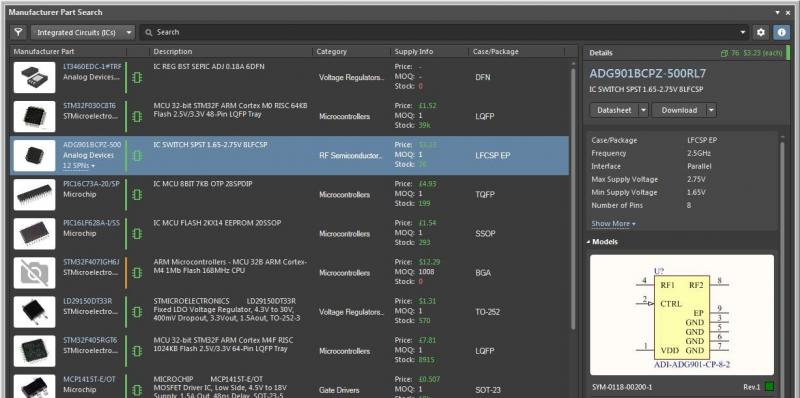
The Manufacturer Part Search panel in Altium Designer gives you a great estimate of prices and helps you find PCB footprints for your libraries.
Altium’s Supply Chain Tools Are Your PCB Cost Calculator
The Manufacturer Part Search panel in Altium Designer is the first step in finding components, footprints, and sourcing data. Unfortunately, the supply chain can change quickly, and a circuit board design team may find their desired components have gone out of stock by the time they start planning their manufacturing run. PCB components can also go obsolete or EOL, and a design team needs to spot and remove these early to ensure their product has the longest possible lifetime.
Once a team of Altium Designer users starts planning their manufacturing run, they can use the ActiveBOM utility to get a deeper look at PCB supply chain. Users will see a complete list of distributors, component stocks, prices, MOQs, lead times, and part numbers when they create their BOM with ActiveBOM. Because this is the final step before manufacturing, designers can quickly identify whether they can source components at their required volume, or if alternative components need to be selected and placed in the layout before production.
Prepare the Documentation You Need for Quoting and Production in Altium Designer
Altium has helped solve supply chain problems by partnering with major electronics distributors. However, creating a BOM is just the first step in preparing a design for manufacturing. A circuit board design team also needs to create their Gerbers, fab and assembly drawings, and other documents before their new design will go into production. These tasks can be time consuming and require multiple programs, but Altium Designer has streamlined this process.
The Output Job file utility and Project Releaser tool lets designers instantly generate their manufacturing documentation in standard file formats. There’s no need to export a PCB layout into an external program; all data is taken directly from schematics and the PCB layout. Designers can also customize various aspects of their deliverable package to meet their fabricator’s needs.
- Selecting components is an important part of developing a PCB cost estimate for your new product. Your sourcing tools should be part of your PCB design strategy to help you create the lowest cost and most reliable designs.
Learn more about using sourcing tools as part of your PCB design strategy.
- Once you’ve selected the components you need for your design, Altium Designer streamlines the entire design process and helps you stay productive.
Learn more about designing your circuit board in Altium Designer.
- The ActiveBOM utility gives you a final look at the PCB supply chain and helps you finalize your production order. A PCB cost calculator can’t provide this level of detail and accuracy.
Learn more about using ActiveBOM to help you source components.
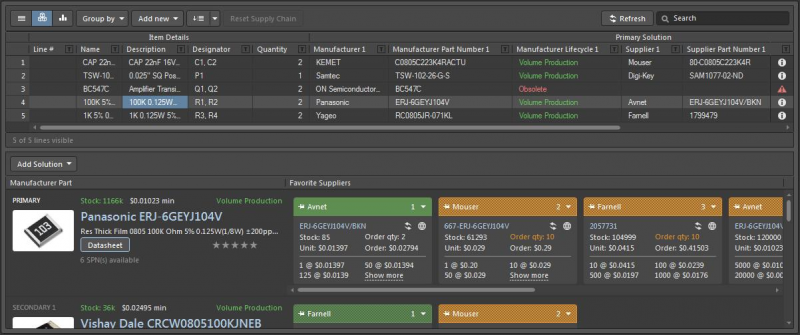
The Manufacturer Part Search panel in Altium Designer gives you a great estimate of prices and helps you find PCB footprints for your libraries.
Altium Designer Gives You More Than Supply Visibility
While supply chain visibility is important for anyone involved in a PCB design project, what’s more important is that your supply chain features are instantly accessible in your PCB design software. When you can look at the supply chain within your design software, it’s easy to spot expensive components, suitable alternative components, and parts models that have verified footprints. This all helps cut down on costs, risk of budget overruns, and risk of redesign before manufacturing.
Perhaps most importantly, integrating supply chain, manufacturing, and circuit board layout into a single application keeps you productive. Altium Designer gives you all of these important features in a single application. You won’t have to switch between applications to design high-quality circuit boards, source components, and prepare for fabrication. Everything you need is unified in a single program.
The Power of a Unified Design Interface in Altium Designer
Altium Designer’s integration between sourcing, design, and manufacturing comes from its underlying rules-driven design engine. All of the design features in Altium Designer are built on the same application engine that enforces a single set of design rules throughout the application. The DRC engine runs as you create your board and flags errors in real time, letting you correct them before you finish a design.
- Altium Designer’s unified design environment helps you create the most accurate designs and stay productive with a comprehensive set of circuit board design features.
Learn more about Altium Designer’s unified design environment.
- When you use the Altium 365 platform, you’ll have access to a complete solution for component data management and sourcing. All data is instantly accessible within Altium Designer or in a web browser.
- When you need to bring component management and supply chain visibility on-premises, Altium Concord Pro provides an enterprise-level solution that beats any PCB cost calculator.
Learn more about enhancing Altium Designer with Altium Concord Pro.
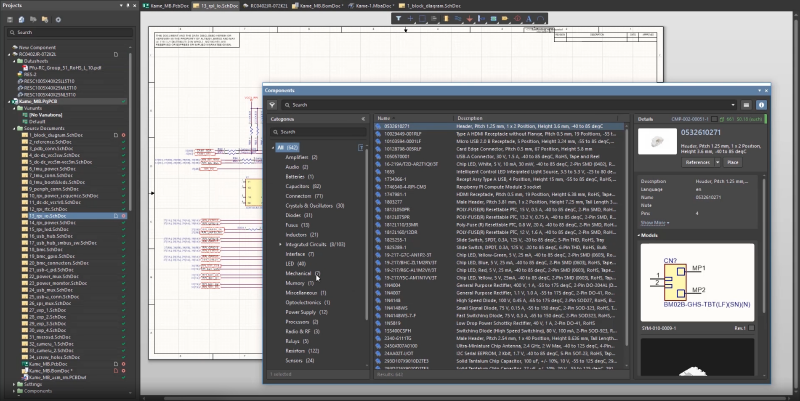
Altium Concord Pro and the Altium 365 platform provide the supply chain visibility design teams need to create cost estimates for their PCB designs.
In the past, circuit board designers were forced to break out a pen and paper to determine a PCB cost estimate. Today, Altium Designer is helping circuit board designers stay productive, create cutting-edge technology, and take control of the sourcing and manufacturing process. Instead of using a PCB cost calculator to estimate component costs, use the supply chain features in Altium Designer.
Altium Designer on Altium 365 delivers unprecedented integration to the electronics industry until now relegated to the world of software development, allowing designers to work from home and reach unprecedented levels of efficiency.
We have only scratched the surface of what is possible to do with Altium Designer on Altium 365. You can check the product page for a more in-depth feature description or one of the On-Demand Webinars.

关于作者
Related Technical Documentation
相关资源
目录
Solutions for Every Role and Team
- Discover and evaluate design options earlier
- Develop in one shared workspace
- Scale with control and compliance
- Connect every stage of hardware development
Learn More
Thank you, you are now subscribed to updates.



 沪公网安备 31010502006411号