







Managing Your Circuit Board Parts in Altium Designer


There’s a multitude of component manufacturers, and each produces a huge number of components. No one can keep track of all information for every circuit board part. PCB components contain more information than just electrical specifications. Your PCB components also contain pin layouts, schematic symbols, SPICE model information, and even 3D models. Today’s PCB design teams need solutions to help them keep their circuit board parts and libraries organized and shareable.
The right PCB design software can help you organize all of this information and help you build the best possible PCB. Altium Designer includes a suite of built-in component management and creation features, and the software integrates with the world-class data management features in Altium 365. This desktop and cloud solution makes it easy to track, access, and use circuit board parts in your designs.
ALTIUM DESIGNER
A PCB design software package with the best component management tools.
Electronic components such as resistors, capacitors, and transistors are like the critical organs that allow your printed circuit board parts to come to life as one cohesive unit. Remove one component, and the whole ecosystem is at risk of collapse. The components on a PCB include several pieces of information, and design teams need to keep track of this information in their PCB layouts and electronic circuits. Keep reading to learn more about organizing your circuit board parts, and to see how today’s best PCB design software makes this easy.
Managing Electronic Components in Your PCB Design Software
Modern PCB design software stores components in PCB libraries and these files include all the essential information circuit board design tools need to place electronic components into a layout. This information includes:
- PCB footprints with land patterns and component outlines
- Schematic symbols with accurate pinouts and SPICE simulation models
- 3D models, normally stored as STEP files
- Short descriptions with electrical information
- Sourcing data (MPN, distributor PN, price, stocks, and lead time)
Your component library needs to include this information, which will ensure your PCBA matches the design on your computer screen. Most PCB design applications only include a portion of this information in component libraries. They often force you to create your own PCB footprints, symbols, and 3D models, and they don’t have a way to give you updated component sourcing information or specifications. You’ll have to manually synchronize data into your component libraries and your bill of materials to ensure you can get your design manufactured.
Manage Components From Design to Production
The best CAD tools can do more than just import components into your electronic circuits. Altium Designer gives you unparalleled access to the electronic component supply chain and will instantly import updated data into your parts libraries, and into your bill of materials. When you move to production, your PCB design software uses information from your component libraries and layout to generate your bills of materials and Gerber files for your manufacturer.
- PCB designers can stay productive and prevent failed fabrication runs when they have accurate, updated component data in their PCB libraries.
- Altium Designer helps keep your up-to-date supplier information and CAD models in your component libraries.
Learn more about the supplier information you need in your PCB libraries.
- When it’s time to prepare for production, Altium Designer will automatically pull important PCB supply chain information into your bill of materials.
Learn more about the smart bill of materials features in Altium Designer.

Bill of materials generation is easy in Altium Designer
Create Custom Components in Your PCB Design Libraries
Not all component CAD models can be found from component vendors or parts creation services. Oftentimes, you’ll need to create CAD models for your components, even when the component sourcing data is available from a supply chain service. With the best set of component creation features, you can fill out your component libraries with accurate CAD models and accurate sourcing data so you can produce your PCBA.
If you need to create components, the CAD tools in Altium Designer will make component creation and access easy. You can quickly create parts for your board with IPC-compliant or custom footprints, and you can import your custom components into your PCB design documents. It’s easy to place components around your board with the best set of component creation and management features in Altium Designer.
Managing Basic and Custom Component Data in One Place
With Altium Designer, you don’t have to use separate databases or utilities to manage your component data, you can do everything in one place. Once it’s time to move your board into production, your bill of materials will grab supplier information directly from your component libraries, you won’t have to use an external bill of materials tool to plan for manufacturing. You can work with greater productivity and ensure successful manufacturing with Altium Designer.
- You can reduce your component creation time by leveraging component templates and reusing old component data in Altium Designer.
- Whenever you can’t find CAD models for your components, or you need to create a proprietary component, Altium Designer has the parts creation features you need.
Learn more about quickly creating high pin count components.
- The Manufacturer Part Search Panel in Altium Designer is your portal into the PCB supply chain, giving you access to CAD models and sourcing data in a single window.
Learn more about the Manufacturer Part Search Panel in Altium Designer.
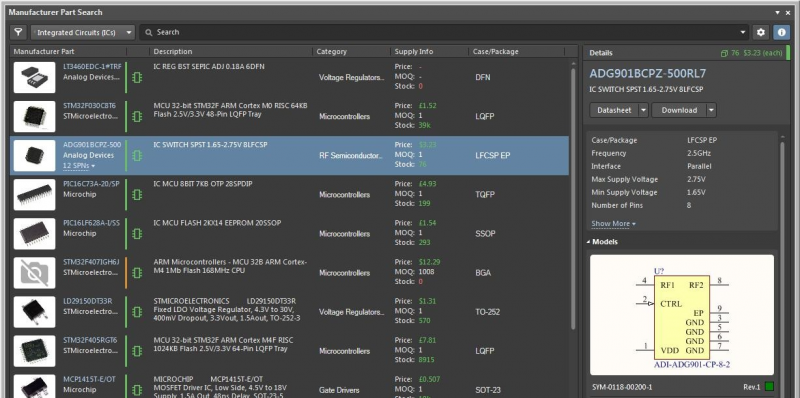
The Manufacturer Part Search Panel in Altium Designer
Stay Productive in a Single Application with Altium Designer
Instead of using PCB design software that separates critical features into different applications, Altium Designer places everything you need in a single program. Your design and production planning features are accessible in the same application, and your component data will be synchronized across all your PCB design tools. Only Altium Designer keeps you productive and helps you stay organized as you create cutting-edge technology.
Altium Designer Has the Best Component Management Features
Working within a unified design environment enhances your productivity, reduces the chances of errors, and streamlines the transition from design to production. Altium Designer gives you access to a massive component library that gives you the power to create any device you can imagine. Once you move to production, you’ll have access to component sourcing information that can be integrated into your bill of materials. No other PCB design application helps you stay this productive.
- Altium Designer brings design and component management into one application. If you want to stay organized and productive, use the only fully integrated design application in the industry: use Altium Designer.
Learn more about the unified PCB design features in Altium Designer.
- When you need to store, share, access, and update your circuit board parts and your PCB project data, use the Altium 365 platform.
- You won’t lose your PCB libraries when you start using Altium 365. You can migrate your existing libraries onto a managed cloud environment and access them anywhere through Altium Designer.
Learn more about migrating your PCB libraries onto the cloud with Altium 365.
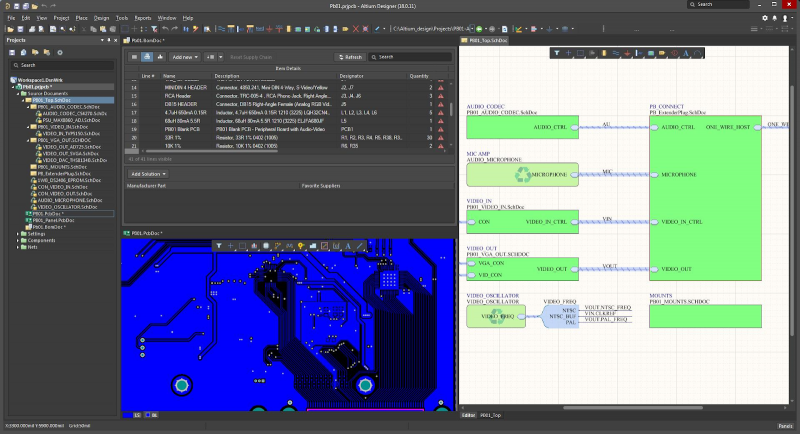
Access a complete design environment in Altium Designer
If scouring the internet for component sourcing information and broken component libraries are ruining your day, you need a great PCB design software package like Altium Designer. Only Altium Designer and the Altium 365 platform provide a complete component creation, management, and sourcing solution for today’s design teams.
Altium Designer on Altium 365 delivers an unprecedented amount of integration to the electronics industry until now relegated to the world of software development, allowing designers to work from home and reach unprecedented levels of efficiency.
We have only scratched the surface of what is possible to do with Altium Designer on Altium 365. You can check the product page for a more in-depth feature description or one of the On-Demand Webinars.

关于作者
Related Technical Documentation
相关资源
目录
Solutions for Every Role and Team
- Discover and evaluate design options earlier
- Develop in one shared workspace
- Scale with control and compliance
- Connect every stage of hardware development
Learn More
Thank you, you are now subscribed to updates.


 沪公网安备 31010502006411号