










How the Best Integrated PCB Libraries Compare Electronic Components to Lower Development Costs


With development schedules becoming tighter and technology advancing at an ever faster pace, designers and engineers need tools that help them cut development costs and stay competitive in every way. This means designers need supply chain tools that help them compare electronic component prices and manage their fabrication data in a single program.
Each integrated library helps lower development costs and time by providing the supply chain information you need alongside your PCB design tools. Altium and Designer and Altium Concord Pro provide these features on the Altium 365 platform, giving you everything you need to select and source components. The first step in reducing your design time and cost is to make the switch to Altium Designer.
ALTIUM DESIGNER
Altium Designer’s integrated PCB libraries lower development costs and allow you to compare electronic component prices within your design software.
Electronic component pricing comparison requires collecting vast amounts of information in one place. Before starting a design, many circuit board layout engineers need to spend time creating PCB footprints and schematic symbols in their libraries. Designers also need prices and sourcing data for their components to ensure they can meet their budgets. Creating one database with all electronic components for comparing pricing and sourcing is the best choice, but this takes a huge amount of time.
Enter Altium Designer and the Altium 365 platform provide a better way to manage component data and compare electronic component prices. This complete platform eliminates the need to manually create an electronic component database with component prices. Instead, you can access all your important component data from verified distributors in Altium Designer’s unified environment. You can save time and development costs when you use the integrated design and management solutions in Altium Designer.
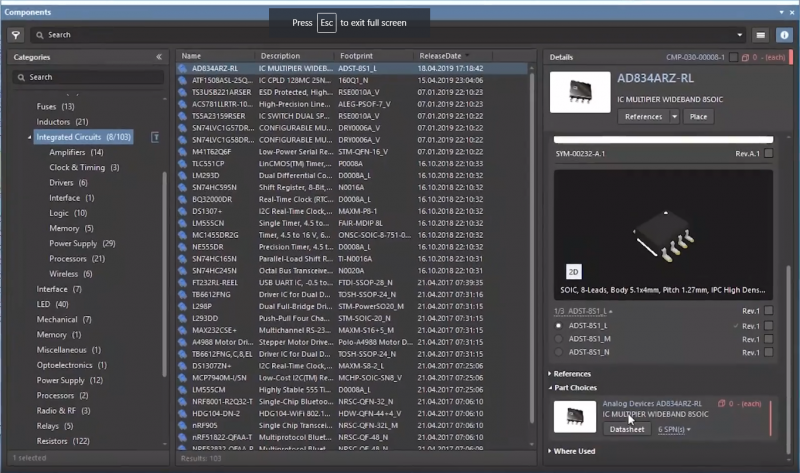
Get complete access to a huge range of components with Altium Designer.
Worldwide Electronic Component Pricing for Millions of Parts
There are a number of problems that can trigger a redesign during the PCB design and development process. Whenever a schematic symbol is updated, a component becomes obsolete, PCB footprints are updated, or a model is revised, the library containing the old data needs to be updated. Designers need updated component data to ensure their products have the longest possible lifetime and lowest production costs.
Updating component data and populating libraries with new data can be as time-consuming as a redesign unless you have access to a reliable data management system. The best supply chain management tools give you access to updated prices and sources data within your PCB design software. This is a much better choice than using a 3rd party tool or manually creating your own database for tracking components.
Don’t Compile Components Databases, Use Integrated Libraries
With millions of circuit board components available on the world market, you need a way to quickly access electrical and sourcing information. Keeping everyone on your team synchronized takes a centralized solution like Altium Designer. The integrated component libraries in Altium Designer eliminate the time required to update your design team when adding new components to a circuit board. This lets everyone work from the same set of component data, rather than compiling individual databases.
Being able to efficiently collect sourcing and pricing data from multiple vendor sites results in huge cost savings. With Altium Designer, component updates are synchronized across your design, eliminating the need for extensive redesigns. Designers don’t need to recreate every schematic, and only minor changes are needed in the PCB layout. This is much easier than manually downloading components from vendors or search engines and adding them into your own libraries.
- When your integrated libraries automatically update with new sourcing information, you can anticipate supply chain changes and keep your design data current.
Learn more about component updates in your PCB design software.
- Component data changes should be instantly mirrored in your design data. You can synchronize your design and component data when you use integrated libraries and design management tools.
Learn more about synchronizing your design data and components.
- When you have supply chain features that allow you to compare electronic component prices, you can develop a more accurate cost estimate before you consult with a fab house.
Learn more about creating a PCB manufacturing cost estimate.

Altium 365 gives you access to verified 2D and 3D CAD models alongside verified schematic symbols for circuit design. Access all the components you need in Altium Designer with the Altium 365 platform.
Lower Development Cost with Instant Documentation and Design Reuse
When you import library data into a new design or reuse existing design data during product development, the data in that library needs to be current if you want your design to be fabricated. When you have access to real-time supply chain information, you can immediately add these updated components to any design you want to reuse. This speeds up development times and reduces development costs.
Whether you’re reusing an old design or creating a new one, your manufacturing documentation also needs to include current information. Don’t generate manufacturing documents from stale data, use integrated libraries that include all the design, sourcing, and lifecycle information you need. This is another area where a data management tool will help you control costs and keep your PCB footprints, schematic, PCB layout, and component data up to date.
Use Aggregated Component Data to Prepare for PCB Manufacturing
The electronics supply chain moves quickly, and preliminary BOMs can go obsolete between design reviews. This makes design reuse and preparing for production tricky. Purchasing partners might be left scrambling for updated component information from design teams to track against multiple pricing databases. Pricing remains a moving target, difficult to manage in a constantly changing development environment.
You can eliminate these management tasks during design and manufacturing preparation with the complete set of circuit board design and management features in Altium Designer. You’ll have access to a managed supply chain solution alongside the world’s best printed circuit board design tools.
- Smaller service bureaus and huge electronics companies can all benefit from a managed supply chain visibility solution. Altium Designer makes these solutions accessible alongside world-class design tools.
- Data management tools with supply chain visibility in Altium Designer allow you to quickly select components, compare prices, and import this information into your bills of materials.
Learn more about accessing sourcing information in your PCB design software.
- Multiple factors determine the price of a PCB, and your design tools should make it easy to find the pricing data you need to develop a project budget.
Learn more about PCB pricing and comparing component prices.

Altium Designer’s Content Vault provides real-time pricing and sourcing of electronic parts
Dynamic Component Pricing and Sourcing in Altium Designer
The best part about working with the integrated libraries in Altium Designer is the ability to see data that is aggregated from multiple distributors in a single location. During early design development, comprehensive information about any one part is available in one place. Circuit board designers can select the most cost-effective options for their design while viewing comparable components in a single location.

The Manufacturer Part Search Panel lets you compare electronic component prices and import CAD data into your PCB projects.
The image above shows the Manufacturer Part Search Panel in Altium Designer, which can be used to get a complete view of the electronics supply chain. This tool provides a simple way to quickly compare electronic component prices, find symbols/footprints, compare lead times, and view component specifications. The parts you find in this window can be immediately imported into Altium Designer and placed in your design documents. No other design program makes finding and placing components this easy.
The Unified Design Environment in Altium Designer
With one parts library interfacing with schematic capture, PCB layout, and supply chain features, you’ll have everything you need to select and place components in a single program. PCB layout designers have access to dimensional information, associated footprints, and 3D modeling tools for advanced printed circuit boards.
Altium Designer and Altium 365 are unique because they integrate all your important design tools with the electronic components supply chain to give complete pricing, sourcing, lifecycle, and lead time data in a single program. Designers can view sourcing and pricing data as they find components for their designs, and they can easily compare electronic component prices early in the design process. Best of all, Altium 365 can be used to provide this data in a web browser or within Altium Designer.
- Powerful CAD tools are the cornerstone of Altium Designer. You’ll have a complete toolset for PCB design, layout, and manufacturing when you use Altium Designer.
- Once you find the components you need, you can place them in 2D and 3D with the native ECAD/MCAD co-design tools in Altium Designer.
- When you need access to integrated PCB libraries with complete sourcing information, use the supply chain tools in Altium Designer and Altium 365.

View and manage your component data and work in 3D with Altium Designer.
Once you have integrated PCB libraries to help you lower development costs and compare component prices, you won’t go back to third-party supply chain solutions. Altium Designer gives you the component management and PCB design tools you need together in a single program. When you need to plan your next printed circuit board for manufacturing, use the complete set of PCB design features in Altium Designer.
Altium Designer on Altium 365 delivers an unprecedented amount of integration to the electronics industry until now relegated to the world of software development, allowing designers to work from home and reach unprecedented levels of efficiency.
We have only scratched the surface of what is possible to do with Altium Designer on Altium 365. You can check the product page for a more in-depth feature description or one of the On-Demand Webinars.

关于作者
Related Technical Documentation
相关资源
目录
- Worldwide Electronic Component Pricing for Millions of Parts
- Don’t Compile Components Databases, Use Integrated Libraries
- Lower Development Cost with Instant Documentation and Design Reuse
- Use Aggregated Component Data to Prepare for PCB Manufacturing
- Dynamic Component Pricing and Sourcing in Altium Designer
Solutions for Every Role and Team
- Discover and evaluate design options earlier
- Develop in one shared workspace
- Scale with control and compliance
- Connect every stage of hardware development
Learn More
Thank you, you are now subscribed to updates.







 沪公网安备 31010502006411号