



Altium Designer’s Board Layout Software

At a Glance
You don’t have time to wrestle with yesterday’s outdated printed circuit board design tools. What you need is Altium Designer’s circuit layout software.


Handling the ever-growing complexities of today’s routing demands requires board layout software that can keep up. When yesterday’s tools are no longer getting the job done, get back on the road of productive design today with the most powerful easy draw PCB design layout software. When you need powerful board layout software, you need to easily complete the following tasks:
- Visually and easily manage your PCB copper pours
- Peace of mind PCB layout with constraint-driven design
- Save manufacturing costs by simple-to-use panelization
- Streamline PCB pre-routing setup with dynamic smart object placement
- Define multiple stackups, rigid and flex regions, and plan for PCB manufacturing
You’ll find all these features and many more in Altium Designer, the world’s most powerful and intuitive board layout software.
Altium Designer - The world’s most powerful and easy to use advanced PCB design software for electronics design.
PCB designers are often faced with a difficult task: deliver high-quality designs on time with out-of-date and incomplete PCB design software. Does this sound like something you have to deal with as a PCB designer? Most PCB fabrication software packages lack important design tools, or these tools are difficult to use. If this sounds like your board layout software, then you should take a look at the cutting-edge PCB design features in Altium Designer.
Instead of working with yesterday’s design tools, you need to be able to quickly import your board into a new PCB layout. You need to easily set up design rules that help you place components with confidence. You need to be able to depend on the latest generation of routing tools that help you finish your design. You need advanced functionality that allows you to work with multiple boards in the same assembly. You need to verify power distribution and signal integrity in your design. You’ll find all these features and much more in Altium Designer, the world’s most powerful board layout software.
PCB Layout Software That Includes Everything You Need
The first thing you need before creating a PCB layout is a schematic editor. You’ll need to design your circuits in the schematic editor and import components into a new PCB with an integrated schematic capture tool. Trace routing is a cornerstone of PCB design tools layout, and no job is complete without connecting components with traces in a PCB trace software.
Altium Designer includes a combination of PCB design tools that are designed to work together in the same environment. In addition to manual and auto-routing routines you expect in your PCB design tools, Altium Designer includes the ActiveRoute module. This user-guided auto-router creates ultra-accurate trace routing that complies with your design rules. Once you’ve finished your PCB layout, you can use the documentation features in Altium Designer to prepare for PCB manufacturing.
Powerful Functionality for Advanced Printed Circuit Board Design
Advanced circuit boards require more powerful PCB design tools than what you’ll find in free circuit layout software. When you’re dealing with multi-board assemblies and high-density routing, your PCB layout design software should help you expedite your designs and quickly create new circuit boards without using multiple programs. With Altium Designer, you can define multiple boards in the schematic editor, and you can quickly route high-speed designs with advanced PCB design tools. No other circuit board drawing software provides this level of functionality.
- The schematic editor in Altium Designer is extremely easy to use, and it includes an integrated schematic capture tool.
See how you can get started with design and schematic capture in Altium Designer.
- There are some essential PCB design tools you should expect to find in the world’s most powerful board drawing software.
Learn more about the essential circuit board design features in Altium Designer.
- Altium Designer gives you advanced printed circuit routing features alongside CAD tools for completing your PCB layout.
Learn more about high-speed routing guidelines with advanced printed circuit layout features.
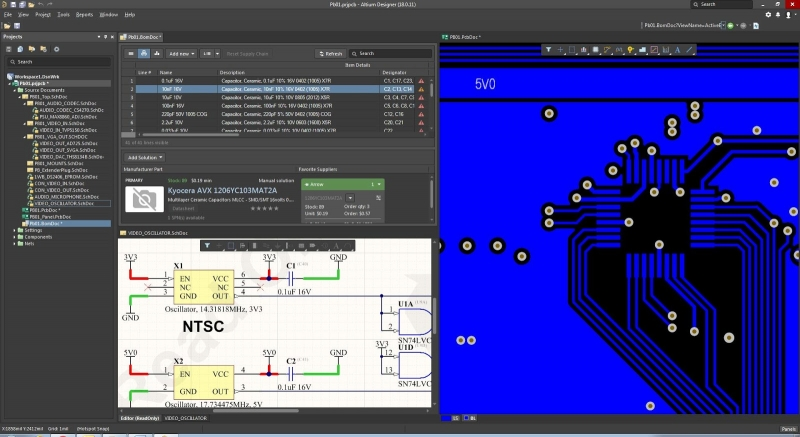
The schematic editor and printed circuit layout features in Altium Designer.
What to Expect in Advanced PCB Layout Software
Free printed circuit board design software doesn’t give you the features you need to finish an advanced layout. Simpler PCB design platforms force you to route traces individually and makes component placement difficult. You won’t have integrated multi-board assembly tools, and you’ll only be able to create simpler single-board products in free board layout software.
Altium Designer gives you a comprehensive set of routing features that operate in 2D and 3D. The advanced routing features simplify HDI design, controlled impedance design, and BGA fanouts for advanced products. These design features are easy to access alongside the standard schematic editor and schematic capture features. You won’t have to switch to an external program to complete powerful layouts in single-board and multi-board assemblies.
Finish Your Circuit Board with Analysis and MCAD Features
Once you’ve finished your circuit board layout, there are several other tasks to perform. You need to verify the design’s signal integrity and confirm that your power delivery network is designed correctly. You may need to link multiple system boards together and examine their mechanical mating in 3D. Altium Designer allows you to do all of these tasks before you prepare your circuit board for fabrication and PCB assembly.
- Altium Designer gives you the ability to bring each circuit board into a single design session. You can import existing circuit board layouts and combine them into a multi-board system.
- High voltage and high power boards need careful PDN simulation and analysis to prevent thermal problems and excessive voltage drops.
- To reduce your workload, Altium Designer has been updated and enhanced with an intuitive user interface that will increase your efficiency when working with the tools.
Learn more about the basics of signal integrity analysis in your PCB.
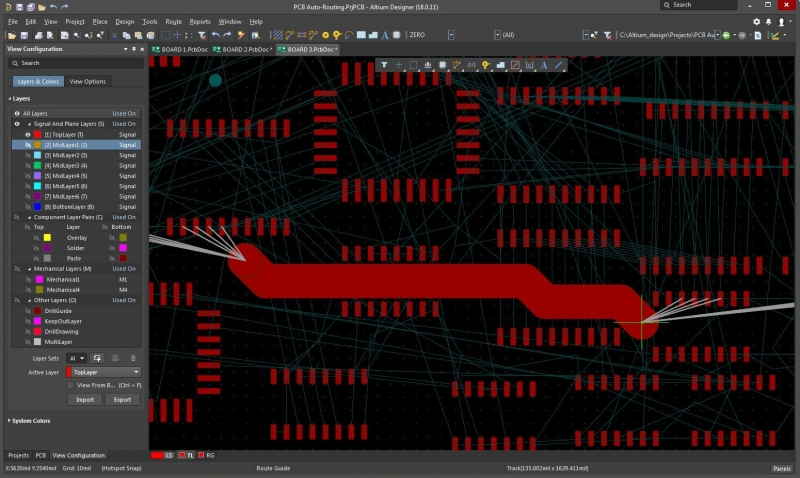
The ActiveRoute tool in Altium Designer makes routing multiple traces easy in 2D and 3D.
From Circuit Board Layout to PCB Manufacturing
Altium Designer’s schematic editor and PCB editor use design rules to define the circuit board design requirements. These design rules collectively cover every aspect of a design, and they form a set of instructions for the PCB editor to follow. Your printed circuit routing widths, clearances, plane connection styles, routing via styles, and other design rules can be monitored in real-time by the online design rule checker (DRC). Altium Designer rules are not attributes of the objects, they are defined independently of objects in a circuit board.
Altium Designer Helps You Get to PCB Manufacturing
With Altium Designer, you can escape the problems of a mixed-tool system and rely on a unified data model to make circuit board design and layout easy. This means you can design schematics, use schematic capture to create a new PCB, route printed circuit traces, and prepare for PCB assembly in a single program. The PCB layout design features make component placement and routing easy. Altium Designer’s rules-driven design engine is a huge advance over free PCB design and layout software.
- Altium Designer is the only board layout software package that combines industry-standard circuit board design features into a single application.
Learn more about Altium Designer integrated printed circuit board design environment.
- You can easily generate PCB manufacturing and assembly outputs in Altium Designer’s unified design environment.
Learn more about generating PCB manufacturing outputs in Altium Designer.
- If you don’t want to lose your old designs, you can easily convert your legacy design files into Altium Designer projects.

Create manufacturing drawings with Altium Designer’s Draftsman feature.
Altium Designer includes all the basic and advanced design features needed to build powerful electronics, and Altium gives you the tools you need for success. You’ll have access to the AltiumLive forum, blogs, and podcasts from industry experts, and design tutorials through Altium Academy. No other PCB design software company provides this level of support.
You can’t afford to put your designs in the hands of outdated free circuit board layout software. Altium Designer gives you the most advanced printed circuit layout tools to create powerful circuit boards. Altium also knows your circuit board isn’t complete until you deliver it to your PCB manufacturer. With Altium Designer, you’ll have everything you need to turn your new PCB design from an idea into a finished product. Altium Designer’s PCB layout tools are ready to go to work for you today. Take a look at Altium Designer for the most complete, advanced, and powerful PCB design software.
Altium Designer is more than just a design tool. Altium Designer combined with Altium 365 delivers an unprecedented amount of integration to the electronics industry, allowing designers to work from home and reach unprecedented levels of efficiency.

关于作者
Related Technical Documentation
相关资源
目录
- PCB Layout Software That Includes Everything You Need
- Powerful Functionality for Advanced Printed Circuit Board Design
- What to Expect in Advanced Board Layout Software
- Finish Your Circuit Board with Analysis and MCAD Features
- From Circuit Board Layout to PCB Manufacturing
- Altium Designer Helps You Get to PCB Manufacturing
Solutions for Every Role and Team
- Discover and evaluate design options earlier
- Develop in one shared workspace
- Scale with control and compliance
- Connect every stage of hardware development
Learn More
Thank you, you are now subscribed to updates.





 沪公网安备 31010502006411号