






Understanding Rules And Constraints


This webinar will discuss how Altium Designer supports your design process with hierarchical rules and constraints. Knowing how to define design guidelines enables you to create first pass designs without having to memorize every requirement.
Why use Rules and Constraints?
Every logical schematic design defines requirements for your physical PCB. Satisfying these requirements requires understanding and consistency throughout the entire design process. How do you validate every requirement while maintaining accuracy?
There are many challenges to requirement adherence, but we will focus on three challenges and how we will be able to overcome them with Altium Designer.
1. Requirement Interactions
Synchronize
Schematic/Logical Requirements
PCB/Physical Requirements
Organize
Categorize
Scope
Prioritize
Rule Hierarchy
Conflicting Scope
2. Error Resolution
Identification
Seeing Errors Early
Navigation
Associated Design Aspects
Correction
Fixing Errors While Avoiding New Ones
3. Validation and Proof
Validation
Requirement Compliance
Documentation
Requirement Visibility
Reproducibility
Traceability
Overview of Rules and Constraints Key Benefits and Capabilities
Benefits
- Define scope, category, and prioritization of design constraints
- Validate and report logical and physical design requirements
- Automate and resolve DFM and electrical checks
Electrical and Design Rules
Define logical and physical requirements.
Enables rule, constraint, and check hierarchy.
5 Steps to Rule Creation:
1.Create New Rule
2.Name Rule
3.Define Scope
4.Set Value
5.Adjust Priority
Rules and Constraint Hierarchy
Visualize Scope and Priority
Organize requirements
Add/remove items quickly
Traceability and reproducibility
Save/share hierarchy
Rule Wizard
Quick, guided rule and constraint creation
Rule type visibility
Real-time Design Guidance
Automation to ensure requirement adherence
Stops you from making mistakes
Eliminates need to remember all requirements manually
Design Rule Check Options (DRC)
Configure rule checks
Online – real-time as you design
Streamline usage
Batch – executed on DRC
Utilize “Used On”
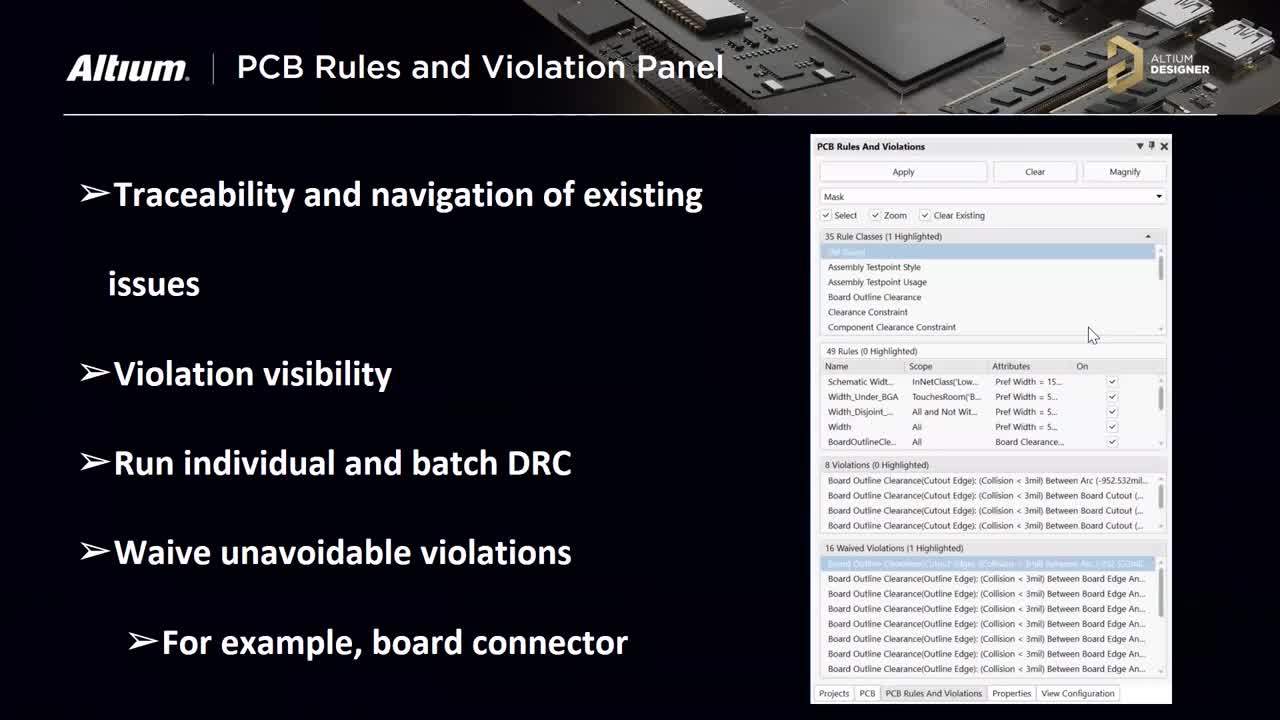
PCB Rules and Violation Panel
Traceability and navigation of existing issues
Violation visibility
Run individual and batch DRC
Waive unavoidable violations
For example, an edge connector failing to meet board outline clearance
Validation Reports
Proof of logical and physical requirement adherence for formal release
Traceability of existing issues
Violation recording
Easily shareable
Questions and Answers
Below are the top asked questions for the webinar. Questions focusing on specific support questions and feature requests are omitted.
Q: Can we create rule templates?
A: You can import and export RUL files and share them with your team to ensure everyone is using the same rules and constraints. You can save them with Altium Vault and Altium NEXUS Server to ensure your rules are in a centralized location for everyone.
Q: What are the filters other than 'room' that can be used for localized rules?
A: You can define the scope of rules with pad name, net, classes, and just about any design aspect.
Q: Where can we get access to the Query functions?
A: You can find the Query Language Reference on our documentation page following the link: https://www.altium.com/documentation/18.1/display/ADES/((Query+Language+Reference))_AD
Q: Did you have to do anything to get the trace to neck down when it entered the room?
A: The rule hierarchy and scope I created in the webinar allow automatic neck-down of the trace as it enters the room with the custom query: TouchesRoom(‘BGA_Area’).
Summary
We discussed the requirement adherence challenges and how rules and constraints help resolve those challenges. You can review below the functionality in Altium Designer and the challenges they address in turn. Properly using rules and constraints allows you to meet and validate all requirements easily without having to manually keep track of everything necessary for a successful design. You are able to prevent, navigate, and correct errors in real-time and benefit from design automation to give you a helping hand.
Requirement Interactions
Define scope, category, and prioritization of design constraints.
Electrical and Design Rules
Rules and Constraint Hierarchy
Rule Wizard
Error Resolution
Automate and resolve DFM and electrical checks.
Real-time Design Guidance
Design Rule Check Options (DRC)
Validation and Proof
Validate and report logical and physical design requirements.
PCB Rules and Violations Panel
Validation Reports

关于作者
Related Technical Documentation
相关资源
目录
Solutions for Every Role and Team
- Discover and evaluate design options earlier
- Develop in one shared workspace
- Scale with control and compliance
- Connect every stage of hardware development
Learn More
Thank you, you are now subscribed to updates.




 沪公网安备 31010502006411号