Skip to main content
Mobile menu
解决方案
Altium Develop
在 Altium Designer 中设计先进 PCB,可独立设计,也可在需要时连接评审、数据来源和发布协同。
Altium Agile Teams
在多学科电子开发与协作中引入结构化流程,确保效率与速度不受影响。
资源 & 支持中心
Altium 365 免费工具
Gerber Compare
在线 PCB 查看器
了解产品
下载
联系我们
关注微信
扫描二维码
关注Altium微信平台
资源 & 支持中心
用户指南
实战讲堂
学习中心
技术文档
支持中心
常见问题
Altium 社群
社群
Bug提交
创意
教育
学生实验室
Free access to professional PCB design software, training, and learning resources for students
教育者中心
A comprehensive education platform providing curriculum, software, training, and classroom resources for educators
Altium 教育课程
Free college- and university-level PCB design curriculum designed to prepare students for real-world engineering careers
Search Open
Search
Search Close
登录
Altium 365
Main menu
首页
PCB设计
团队协作
元器件创建
PCB数据管理
PCB设计输出和文档
ECAD/MCAD
HDI设计
高速设计
多板设计
PCB布局
PCB布线
PCB供应链
电源完整性
RF设计
刚柔结合板PCB设计
原理图输入
信号完整性
PCB设计仿真/分析
软件
Discover
Develop
敏捷团队
敏捷企业
Altium 365
Altium Designer
资源中心
项目
Altium Academy
工程新闻
指南书
新闻通讯
播客
项目
培训课程
网络研讨会
白皮书
首页
Altium 365
电子产品开发行业的 Altium 365 资源
Altium 365 在一个安全的云端协作平台上连接产品设计人员、工程师、采购团队和制造商。凭借集成的设计、供应链、制造和生命周期管理能力,它简化了整个电子产品开发流程。
开始使用 Altium 365
探索 Altium 365 平台
Altium 365 文档
Overview
指南
网络研讨会
视频
BOM Management
Data Security
客户案例
技术文档
All Content
Filter
found
Sort by
Most Recent
Most Popular
Title (A-Z)
Title (Z-A)
Role
ECAD 库管理员
电气工程师
工程经理
IT 经理
机械设计工程师
PCB 设计工程师
采购经理
软件工程师
Software
Altium Develop
Altium Agile 团队
Altium Designer
Altium 365
Assembly Assistant
BOM Portal
Cloud PLM Connector
PLM集成
Configurable Workflows
GovCloud
Jira Integration
MCAD CoDesigner
Octopart
Requirements Portal
Content Type
指南
视频
网络研讨会
白皮书
播客
Region
EMEA
Americas
8x Faster Assembly per Board with Assembly Assistant
2 min
Webinars
Production Managers
Watch the webinar recording and learn how Assembly Assistant can help you achieve substantial time and cost savings and reduce the likelihood of errors.
阅读文章
Beyond Schematics: PCB Assembler
8 min
Blog
Manufacturing Engineers
Learn about the job requirements of a PCB assembly technician and how these skilled workers manage the assembly process.
阅读文章
The Digital Bridge Ecosystem with Joao Beck
25 min
OnTrack
PCB 设计工程师
Today, we are joined by Joao Beck, Altium's Director of Enterprise Technical Marketing, to give us all the details. This new workflow is yet another step in Altium's quest toward a digital ecosystem!
阅读文章
41:54
An Expert Panel Discussion on Altium 365 GovCloud
1 min
Webinars
Engineering Specialists
Watch our exclusive panel discussion featuring industry experts Mahesh Venugopala and Bruno Blasigh as they explore the realm of Altium 365 GovCloud on July 2023.
阅读文章
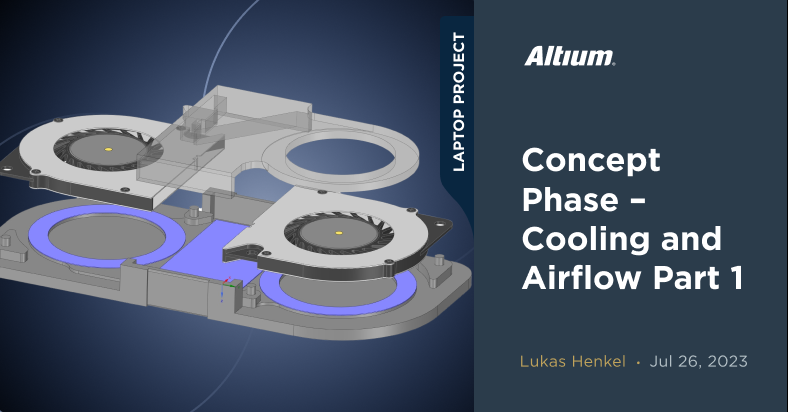
概念阶段 - 冷却与气流 第1部分
1 min
Altium Designer Projects
在这一期的开源笔记本电脑项目中,我们将更仔细地研究冷却系统。首先,我们将关注设备内部的气流,并找出为满足 前一篇文章中定义的要求需要考虑哪些因素。 {"preview_thumbnail":"/sites/default/files/styles/video_embed_wysiwyg_preview/public/video_thumbnails/O0xn2-kPL4o.jpg?itok=SkZpEUXp","video_url":"https://youtu.be/O0xn2-kPL4o","settings":{"responsive":1,"width":"854","height":"480","autoplay":0,"title_format":"@provider | @title","title_fallback":true,"loading":"lazy"},"settings_summary":["嵌入式视频(响应式)。"]} 在概念阶段,我们研究了应在最终产品中实现的关键技术要求。其中一个要求是设备底部不能吸入空气。市场上许多(如果不是大多数)笔记本电脑都是这样做的——而且有充分的理由。在我们深入CAD模型并开始我们自己的设计之前,让我们看看现状,并了解我们可以从已验证的方法中学到什么。 看一看Dell XPS 9500 为了展示现代笔记本电脑中是如何实现冷却解决方案的,我们将看看Dell XPS 9500。这是一款配备i7-10750处理器和NVIDIA GTX 1650 Ti GPU的15英寸设备,在满负荷下可以消耗超过100瓦的功率。因此,其冷却解决方案将比13英寸设备的要大得多,但操作原理保持不变。 在设备底部,我们看到大量的进气口。通风口的阵列几乎延伸到设备底盖的整个长度。 DELL XSP 9500的底部视图
阅读文章
Customer Success Stories
SkyShips
Watch how Altium made designing the world’s most luxurious automotive infotainment systems a celebration of co-creation.
55:58
Creating and Sharing PCB Documentation The Easy Way
1 min
Webinars
Sending your design data for manufacturing can be a stressful time because if you send outdated, incomplete, or unclear documentation
阅读文章
Pagination
First page
« First
Previous page
‹‹
页面
31
当前页面
32
页面
33
页面
34
页面
35
页面
36
Next page
››
Last page
Last »












 沪公网安备 31010502006411号