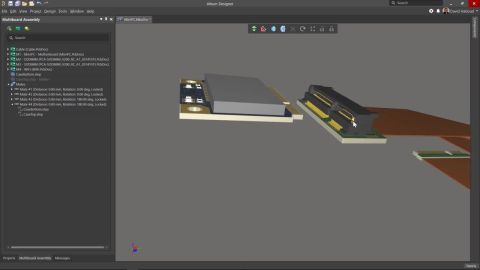


Altium 的 MCAD CoDesigner 技术将机械设计与电气设计领域连接起来,使机械工程师和电子工程师能够在这两个领域之间来回传递已装配元器件的 PCB。 在 Altium 设计软件中,这一功能通过扩展程序 MCAD CoDesigner extension 实现,该扩展程序可在 PCB 编辑器中加载和提取电路板及元器件数据。在 MCAD 软件中,Altium CoDesigner Add-in 执行相同的功能,在 MCAD 软件中加载和提取电路板及元器件数据。 ECAD 和 MCAD 软件通过 Altium 工作区传递设计更改。该工作区既可以托管在 Altium 365 云端,也可以使用 Altium On-Prem Enterprise Server 托管在公司网络中。工作区充当桥梁,ECAD 和 MCAD 软件均与其连接。工作区保存电路板和元器件数据,使 ECAD 和…
Altium Designer developer documentation is currently being migrated to our new documentation platform. In the meantime, you can access the existing Altium Designer SDK and scripting documentation here: Altium Designer SDK and Scripting Documentation
Altium Designer is a leading PCB design environment used by engineers to create schematics, PCB layouts, libraries, and manufacturing deliverables for electronic products. For developers and engineering teams, Altium Designer provides extensibility and automation capabilities through the Altium Designer SDK and scripting framework. These technologies enable the creation of custom tools, workflow…
The Altium Designer SDK is currently in Closed Beta, and available only to a few selected early-access customers. The Altium Designer SDK lets you build custom extensions that integrate directly into Altium Designer – adding commands, automating workflows, and accessing design data through a managed .NET API. This guide walks you through installing the development tools, creating an extension…
The following quick start guides are available, to get you up and running with the Altium 365 and Octopart APIs, and the Altium Designer SDK: Altium 365 API Quick Start Guide Altium Designer SDK Quick Start Guide Octopart API Quick Start Guide
Altium Developer Center is the home for software engineers building on Altium's products. It covers main product areas each with its own APIs, SDKs, and integration surfaces. Access to developer products is managed through Altium Developer Center, where you can enroll in programs to access Altium 365 API, Altium Designer SDK, Embeddable Viewer, and other developer products. Altium 365 Altium 365…
Altium平台(Altium 365)是Altium的各种解决方案--Altium Develop和Altium Agile--的交付平台,它提供了大量的特性和功能(取决于您订阅的解决方案),允许多学科的所有关键利益相关者以安全、无缝和简化的方式连接并协作创建产品设计。 本页仅提供有关该平台部分关键功能的快速参考信息,让您可以快速浏览每项功能的详细信息。 Altium 平台上的工作空间根据您所订阅的Altium 平台解决方案的不同,被提供并标记为Altium Develop Workspace 或Altium Agile Workspace 。如果您目前拥有Altium Designer的有效期许可,只要您使用的是Altium Designer 20.1.14或更高版本,该安装可以继续连接到您现有的Altium 365 Workspace ,以及平台解决方案工作区…
Altium Designer 与 Altium 365 工作区相结合,支持一种面向项目生命周期开发阶段的高级项目架构,简化了版本受控项目的创建和持续工作流程。由工作区管理的集中式存储也使此功能成为其他协作服务的基础。 使用基于工作区的项目有以下主要优势: 简化存储。无需决定存储位置。备份和其他基础服务均由系统负责。 为协作功能奠定基础。 强制实施版本控制。 享受专用评论系统的优势。 通知和状态。整个设计团队都能查看文档状态,包括本地修改。 无需复杂设置即可开展并行 PCB 设计。 能够与多人共享项目,允许他们编辑,或仅查看和评论。 使用项目历史记录功能时可获得完整功能,包括与 VCS 相关的提交事件。 从技术上讲,项目由存储在工作区中的元信息组成,并与工作区内置的基于 Git 的版本控制紧密集成。典型工作流程如下: 用户创建新项目(通过 Altium Designer…
本文重点概述了 Altium Designer 中可用于 PCB 布局的 SMT 设计规则类型,具体介绍了各项规则的控制对象、可定义的约束,以及这些规则如何影响布线和设计规则检查。通过文中的示例,读者可以了解 SMD To Corner(SMD 焊盘到拐角)规则如何设置表面贴装焊盘到第一个走线拐角的最小距离,如何在在线 DRC、批量 DRC 和交互式布线过程中应用,以及它如何与相关 SMT 布线行为协同发挥作用。如果您希望更清楚地了解 Altium Designer 在布局过程中如何处理 SMT 专用规则设置,本文是一个很好的起点。继续阅读,让您在进行 PCB 布线决策时更有把握。 - 清晰概述 Altium Designer 中可用于 PCB 布局的 SMT 设计规则类型。 - 深入了解如何定义规则约束,以及如何在布线和设计规则检查过程中执行这些约束。 - 从实际应用角度理解 SMD…
Learn More