








Altium PCB Special Strings Elegantly Designed for Intuitive Use During Layout


Placing PCB special strings is commonplace within Altium’s workspace with direct access to predefined, and custom, special strings in the Properties Panel. Just DO text!
ALTIUM DESIGNER
Altium special strings allow for a more advanced printed text string and graphic design management during the schematic design and manufacturing process. These special strings, in addition to many other streamlined functions, make Altium Designer the best PCB design software in a professional setting.
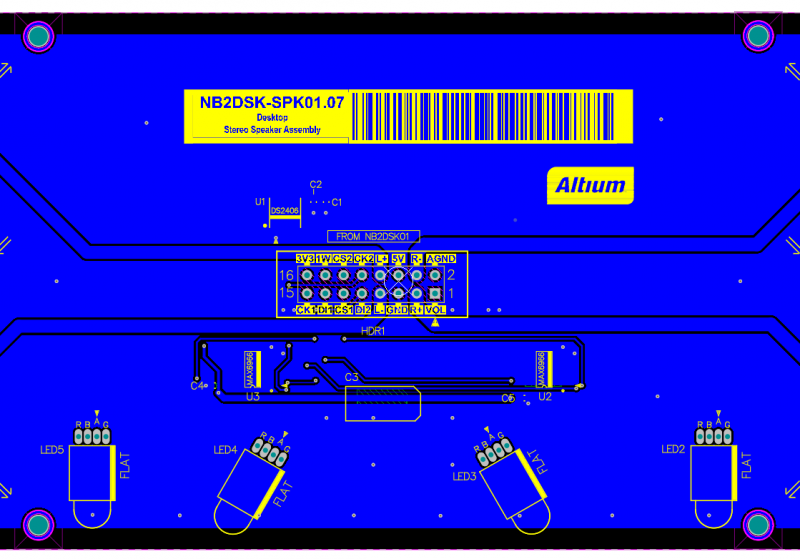
Printed Circuit Board design incorporates design details communicated both graphically and linguistically. Graphics specifically represent finished hardware in files for direct programming of manufacturing equipment. Linguistics legend PCB layers with text and barcode labels add to the otherwise complete design documentation onto the board. Capturing such details directly into design files keeps information directly accessible at any point in the PCBA lifecycle.
EDA software provides text strings attached to objects that identify information important to stakeholders throughout the PCBA’s design and development. This may be dimensioning or layer labeling. It is silkscreen and version control. It may also include barcodes to uniquely identify each PCBA manufactured at the assembly house. With unique identifiers, boards may be tracked and sorted at any point throughout the lifecycle.
Altium Designer provides easy access to predefined or customizable special strings for placement in PCB layout. Its PCB and Library Editors allow direct placement while laying down design specifications within layout. While laying down graphics within the workspace, a properties panel accesses elegant menus able to refine and customize special strings. Names, websites, emails, bar codes, net counts, layer names, and more can be legended and placed using Altium’s PCB special strings.
Communicate Schematic Design Intricacies With Intelligent Legending
Any PCB editor will need a strong schematic dialog and netlist option. Schematic library management is necessary for any engineer, especially one with designators, easy-to-find option dialog, and design objects editing. Make sure that your design software is capable of working through the schematic library and PCB footprint with component properties and parameter in mind.
Transferring PCBA design and manufacturing specifications onto PCB manufacturing files can be tricky. Important information can get lost when separated from the files. Adding text instructions has historically required separate design instructions to communicate with stakeholders. Keeping specification information together with the PCBA throughout its lifecycle has proved challenging.
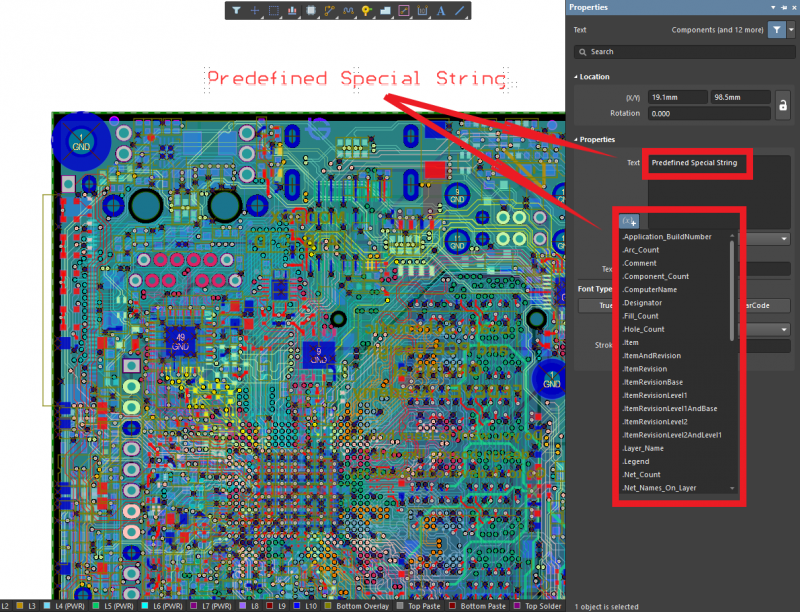
PCB special strings are commonplace in Altium’s Property Panel
Use Software That Integrates Comprehensive Linguistic Specifications
Rather than keeping databases in need of content cataloguing, use a tool that automates tracking. You want an environment that accepts not only graphical representation of your design but linguistic communication alongside graphics. Otherwise, vital information about the graphics is lost. When EDA software incorporates PCB special strings, you don’t have to worry.
- Trust your environment to log your ideas before you release your design.
Designing in an Intuitive Environment Leaves Time for Bright Ideas.
- Capture details for all your custom boards with special strings.
Automate string details and Design Custom NanoBoard Peripherals
- Use special strings in your component libraries
See PCB Component Data Management Resolved with Connected Component Applications
Now that you see the benefit of using special strings when designing PCB layouts, you can search for EDA software that supports linguistic specifications within documentation files.
EDA Software Text Strings Communicate Design Information
A Circuit Board schematic editor with text string and script option management, easy-to-read output and drop-down list functions, as well as a clear understanding of design objects, simulation, and editing should get you just about all that you need to move through your production stages easily. Ensure that you can manage any polygon with ease and arrive at that manufacturing output point without any bug in the system.
Special text strings for intelligent use with PCB layout require elegantly designed user environments within EDA toolsets. Placing text string tools front and center in the design workspace is necessary to complement graphical representation of dimensions or legending. Combining information into one design file further collects design data together, where it should be for design and manufacturing partners. In this way, specifications port with the design documentation throughout the PCBA’s lifecycle.
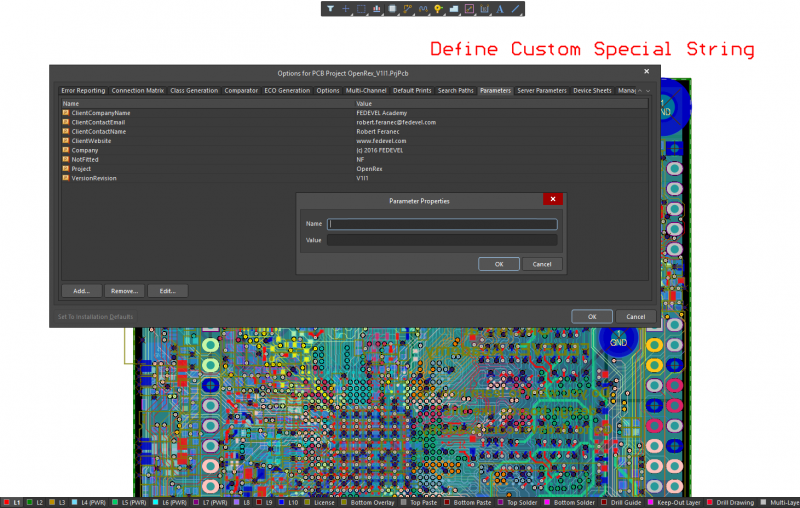
Define PCB special strings in Altium’s PCB Options Panel
Use PCB Layout Toolsets With Easily Accessed Special Strings
You want a PCB layout tool environment that lets you place special strings anywhere within the design. Whether it is on inner layers for easy identification or on outer layers for version information, you want to place the information in the design container. This means access to menus that allow special strings onto specific layers during design layout.
- Take a look at Altium Designer for Unification of Special Features
Listen to Altium Designer: Highlights from the Latest Release with David Marrakchi
- Integrate vital IPC specifications within design documents
Learn about IPC from John Mitchell, CEO of IPC, and his visit to The White House
- Find out how to query for PCB special strings
Prioritize Precision Querying in Circuit Board Design Software
Paying attention to PCB special strings is easy in Altium Designer’s unified environment. Read on to discover easy-to-use menus for including vital design specifications within layout files for manufacturing.
Altium Designer PCB Special Strings Guarantee Information Transfer
Keeping separate documents with detailed notes to document PCB design specifications is so old school. And you don’t need to hold back when you’ve got Altium Designer PCB special strings. PCB special strings are readily accessible from your PCB layout workspace. Directly placement is readily accomplished using the toolbar. Moving to the Properties Panel allows defining text with PCB special strings. PCB special strings allow design specifications to be captured within the design gerbers and associated layer stack information files in the design container.
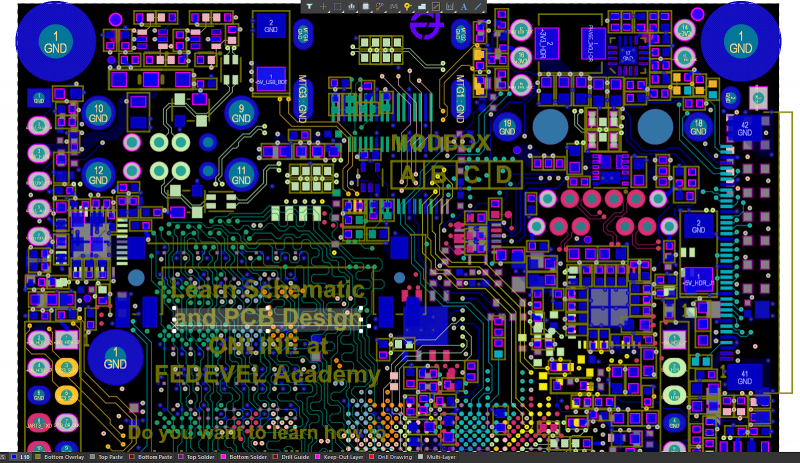
PCB special strings integrate into the PCB design files
PCB Special Strings are Easy to Define and Use in Altium Designer
Altium special strings couple with Altium Designer’s unified schematic design environment to easily add linguistic specifications. Adding PCB special strings text becomes easy with menus carefully crafted for designation of design requirements within the PCB layout files. You don’t need to keep separate title pages where requirements communicated in text get separated from respective gerber files. With Altium, your text becomes special strings that stay with the graphical design details.
- Integrate design and text string into schematic sheets and gerber files, both graphically and linguistically
Take a look at this video showing Altium’s Global Editing capabilities
- Set design rules for PCB special strings for hardware requirements
Watch a video to see how the Design Rules Driver scopes features
- See how PCB special strings add notes to panelization files
Visualize PCB special strings as notes to panelization drawings
Adding and customizing linguistic design requirements to PCB layout graphics is easy with Altium Designer. The PCB Design and PCB Library Editors provide easy-to-navigate menus within the workspace to not only designate necessary text for meeting communication standards but also provide menus for customization. Each is easily found while working on your PCB layout. End your days of frustrating ad hoc notes and move over to Altium Designer’s PCB special strings. Linguistic design requirements for Printed Circuit Boards have a place alongside PCB graphical representation of the hardware with Altium Designer.

关于作者
Related Technical Documentation
相关资源
目录
- Communicate Schematic Design Intricacies With Intelligent Legending
- Use Software That Integrates Comprehensive Linguistic Specifications
- EDA Software Text Strings Communicate Design Information
- Use PCB Layout Toolsets With Easily Accessed Special Strings
- Altium Designer PCB Special Strings Guarantee Information Transfer
Solutions for Every Role and Team
- Discover and evaluate design options earlier
- Develop in one shared workspace
- Scale with control and compliance
- Connect every stage of hardware development
Learn More
Thank you, you are now subscribed to updates.



 沪公网安备 31010502006411号